
6.7. GPU
tab_intro_decade
では、過去20年間の計算能力の急速な成長を示した。
要するに、2000年以降、GPUの性能は10年ごとに1000倍に向上してきた。
大きな機会をもたらすが、同時に、そのような性能に対する大きな需要があったことも示している。
この節では、この計算性能を研究にどう活用するかを説明し始める。 まずは単一GPUの使い方を取り上げ、後の段階で複数GPUや複数サーバー(複数GPU搭載)を使う方法を扱う。
具体的には、単一のNVIDIA GPUを計算に使う方法を説明する。
まず、少なくとも1枚のNVIDIA GPUが搭載されていることを確認してほしい。
次に、NVIDIA driver と
CUDA
をダウンロードし、指示に従って適切なパスを設定する。
これらの準備が完了したら、nvidia-smi
コマンドを使ってグラフィックカード情報を表示できる。
PyTorchでは、すべての配列にデバイスがあり、これを コンテキスト と呼ぶことがよくある。 これまでのところ、デフォルトでは、すべての変数と関連する計算はCPUに割り当てられていた。 通常、他のコンテキストとしてはさまざまなGPUがある。 複数のサーバーにまたがってジョブを展開すると、状況はさらに複雑になる。 配列をコンテキストに賢く割り当てることで、デバイス間でデータを転送する時間を最小化できる。 たとえば、GPU搭載サーバーでニューラルネットワークを学習するときには、モデルのパラメータをGPU上に置くのが普通である。
この節のプログラムを実行するには、少なくとも2枚のGPUが必要である。 多くのデスクトップコンピュータにとっては贅沢かもしれないが、たとえばAWS EC2のマルチGPUインスタンスを使えば、クラウド上では簡単に利用できる。 他のほとんどの節では複数GPUは 不要 であるが、ここでは単に異なるデバイス間でのデータの流れを示したいだけである。
from d2l import torch as d2l
import torch
from torch import nn
from d2l import mxnet as d2l
from mxnet import np, npx
from mxnet.gluon import nn
npx.set_np()
from d2l import jax as d2l
from flax import linen as nn
import jax
from jax import numpy as jnp
from d2l import tensorflow as d2l
import tensorflow as tf
6.7.1. 計算デバイス
CPUやGPUなどのデバイスを、保存や計算のために指定できる。 デフォルトでは、テンソルは主記憶に作成され、その後CPUが計算に使われる。
PyTorchでは、CPUとGPUは torch.device('cpu') と
torch.device('cuda') で指定できる。 cpu
デバイスは、すべての物理CPUとメモリを意味することに注意してほしい。
これは、PyTorchの計算がすべてのCPUコアを使おうとすることを意味する。
一方、gpu デバイスは1枚のカードとそれに対応するメモリだけを表す。
複数のGPUがある場合は、\(i^\textrm{th}\) GPU(\(i\)
は0から始まる)を表すために torch.device(f'cuda:{i}') を使う。
また、gpu:0 と gpu は等価である。
def cpu():  #@save
    """Get the CPU device."""
    return torch.device('cpu')

def gpu(i=0):  #@save
    """Get a GPU device."""
    return torch.device(f'cuda:{i}')

cpu(), gpu(), gpu(1)
(device(type='cpu'),
 device(type='cuda', index=0),
 device(type='cuda', index=1))
def cpu():  #@save
    """Get the CPU device."""
    if tab.selected('mxnet'):
        return npx.cpu()
    if tab.selected('tensorflow'):
        return tf.device('/CPU:0')
    if tab.selected('jax'):
        return jax.devices('cpu')[0]

def gpu(i=0):  #@save
    """Get a GPU device."""
    if tab.selected('mxnet'):
        return npx.gpu(i)
    if tab.selected('tensorflow'):
        return tf.device(f'/GPU:{i}')
    if tab.selected('jax'):
        return jax.devices('gpu')[i]

cpu(), gpu(), gpu(1)
(cpu(0), gpu(0), gpu(1))
def cpu():  #@save
    """Get the CPU device."""
    if tab.selected('mxnet'):
        return npx.cpu()
    if tab.selected('tensorflow'):
        return tf.device('/CPU:0')
    if tab.selected('jax'):
        return jax.devices('cpu')[0]

def gpu(i=0):  #@save
    """Get a GPU device."""
    if tab.selected('mxnet'):
        return npx.gpu(i)
    if tab.selected('tensorflow'):
        return tf.device(f'/GPU:{i}')
    if tab.selected('jax'):
        return jax.devices('gpu')[i]

cpu(), gpu(), gpu(1)
(CpuDevice(id=0), gpu(id=0), gpu(id=1))
def cpu():  #@save
    """Get the CPU device."""
    if tab.selected('mxnet'):
        return npx.cpu()
    if tab.selected('tensorflow'):
        return tf.device('/CPU:0')
    if tab.selected('jax'):
        return jax.devices('cpu')[0]

def gpu(i=0):  #@save
    """Get a GPU device."""
    if tab.selected('mxnet'):
        return npx.gpu(i)
    if tab.selected('tensorflow'):
        return tf.device(f'/GPU:{i}')
    if tab.selected('jax'):
        return jax.devices('gpu')[i]

cpu(), gpu(), gpu(1)
(<tensorflow.python.eager.context._EagerDeviceContext at 0x7f58eef46000>,
 <tensorflow.python.eager.context._EagerDeviceContext at 0x7f58eddb3d40>,
 <tensorflow.python.eager.context._EagerDeviceContext at 0x7f58edc23980>)
利用可能なGPUの数を問い合わせることができる。
def num_gpus():  #@save
    """Get the number of available GPUs."""
    return torch.cuda.device_count()

num_gpus()
2
def num_gpus():  #@save
    """Get the number of available GPUs."""
    if tab.selected('mxnet'):
        return npx.num_gpus()
    if tab.selected('tensorflow'):
        return len(tf.config.experimental.list_physical_devices('GPU'))
    if tab.selected('jax'):
        try:
            return jax.device_count('gpu')
        except:
            return 0  # No GPU backend found

num_gpus()
2
def num_gpus():  #@save
    """Get the number of available GPUs."""
    if tab.selected('mxnet'):
        return npx.num_gpus()
    if tab.selected('tensorflow'):
        return len(tf.config.experimental.list_physical_devices('GPU'))
    if tab.selected('jax'):
        try:
            return jax.device_count('gpu')
        except:
            return 0  # No GPU backend found

num_gpus()
2
def num_gpus():  #@save
    """Get the number of available GPUs."""
    if tab.selected('mxnet'):
        return npx.num_gpus()
    if tab.selected('tensorflow'):
        return len(tf.config.experimental.list_physical_devices('GPU'))
    if tab.selected('jax'):
        try:
            return jax.device_count('gpu')
        except:
            return 0  # No GPU backend found

num_gpus()
2
ここで、要求したGPUが存在しなくてもコードを実行できるようにする、便利な2つの関数を定義する。
def try_gpu(i=0):  #@save
    """Return gpu(i) if exists, otherwise return cpu()."""
    if num_gpus() >= i + 1:
        return gpu(i)
    return cpu()

def try_all_gpus():  #@save
    """Return all available GPUs, or [cpu(),] if no GPU exists."""
    return [gpu(i) for i in range(num_gpus())]

try_gpu(), try_gpu(10), try_all_gpus()
(device(type='cuda', index=0),
 device(type='cpu'),
 [device(type='cuda', index=0), device(type='cuda', index=1)])
6.7.2. テンソルとGPU
デフォルトでは、テンソルはCPU上に作成される。 テンソルがどのデバイス上にあるかを問い合わせることができる。
デフォルトでは、利用可能であればテンソルはGPU/TPU上に作成され、利用できない場合はCPUが使われる。 テンソルがどのデバイス上にあるかを問い合わせることができる。
x = torch.tensor([1, 2, 3])
x.device
device(type='cpu')
x = np.array([1, 2, 3])
x.ctx
[07:26:55] ../src/storage/storage.cc:196: Using Pooled (Naive) StorageManager for CPU
cpu(0)
x = jnp.array([1, 2, 3])
x.device()
gpu(id=0)
x = tf.constant([1, 2, 3])
x.device
'/job:localhost/replica:0/task:0/device:GPU:0'
複数の項を扱うときには、それらが同じデバイス上になければならないことに注意することが重要である。 たとえば、2つのテンソルを足し合わせる場合、両方の引数が同じデバイス上にあることを確認する必要がある。そうでなければ、フレームワークは結果をどこに保存すべきか、あるいは計算をどこで行うべきかさえ判断できない。
6.7.2.1. GPU上での保存
テンソルをGPU上に保存する方法はいくつかある。
たとえば、テンソルを作成するときに保存先デバイスを指定できる。
次に、最初の gpu 上にテンソル変数 X を作成する。
GPU上で作成されたテンソルは、そのGPUのメモリだけを消費する。
nvidia-smi コマンドを使ってGPUのメモリ使用量を確認できる。
一般に、GPUメモリの制限を超えるデータを作成しないように注意する必要がある。
X = torch.ones(2, 3, device=try_gpu())
X
tensor([[1., 1., 1.],
        [1., 1., 1.]], device='cuda:0')
X = np.ones((2, 3), ctx=try_gpu())
X
[07:26:56] ../src/storage/storage.cc:196: Using Pooled (Naive) StorageManager for GPU
array([[1., 1., 1.],
       [1., 1., 1.]], ctx=gpu(0))
# By default JAX puts arrays to GPUs or TPUs if available
X = jax.device_put(jnp.ones((2, 3)), try_gpu())
X
Array([[1., 1., 1.],
       [1., 1., 1.]], dtype=float32)
with try_gpu():
    X = tf.ones((2, 3))
X
<tf.Tensor: shape=(2, 3), dtype=float32, numpy=
array([[1., 1., 1.],
       [1., 1., 1.]], dtype=float32)>
少なくとも2枚のGPUがあると仮定すると、次のコードは2枚目のGPU上にランダムなテンソル
Y を作成する。
Y = torch.rand(2, 3, device=try_gpu(1))
Y
tensor([[0.6195, 0.6906, 0.3363],
        [0.6355, 0.5201, 1.0000]], device='cuda:1')
Y = np.random.uniform(size=(2, 3), ctx=try_gpu(1))
Y
[07:26:56] ../src/storage/storage.cc:196: Using Pooled (Naive) StorageManager for GPU
array([[0.67478997, 0.07540122, 0.9956977 ],
       [0.09488854, 0.415456  , 0.11231736]], ctx=gpu(1))
Y = jax.device_put(jax.random.uniform(jax.random.PRNGKey(0), (2, 3)),
                   try_gpu(1))
Y
Array([[0.57450044, 0.09968603, 0.7419659 ],
       [0.8941783 , 0.59656656, 0.45325184]], dtype=float32)
with try_gpu(1):
    Y = tf.random.uniform((2, 3))
Y
<tf.Tensor: shape=(2, 3), dtype=float32, numpy=
array([[0.99093616, 0.51236033, 0.7667209 ],
       [0.618168  , 0.34049547, 0.804111  ]], dtype=float32)>
6.7.2.2. コピー
X + Y を計算したい場合、どこでこの演算を行うかを決める必要がある。
たとえば、 図 6.7.1 に示すように、X
を2枚目のGPUに転送してそこで演算を実行できる。 単に X と Y
を足しては いけない。そうすると例外が発生する。
ランタイムエンジンは何をすべきかわからず、同じデバイス上にデータを見つけられないため失敗する。
Y は2枚目のGPU上にあるので、2つを足す前に X
をそこへ移動する必要がある。
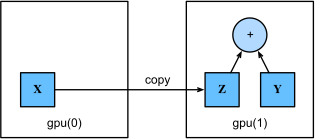
図 6.7.1 Copy data to perform an operation on the same device.
Z = X.cuda(1)
print(X)
print(Z)
tensor([[1., 1., 1.],
        [1., 1., 1.]], device='cuda:0')
tensor([[1., 1., 1.],
        [1., 1., 1.]], device='cuda:1')
Z = X.copyto(try_gpu(1))
print(X)
print(Z)
[[1. 1. 1.]
 [1. 1. 1.]] @gpu(0)
[[1. 1. 1.]
 [1. 1. 1.]] @gpu(1)
Z = jax.device_put(X, try_gpu(1))
print(X)
print(Z)
[[1. 1. 1.]
 [1. 1. 1.]]
[[1. 1. 1.]
 [1. 1. 1.]]
with try_gpu(1):
    Z = X
print(X)
print(Z)
tf.Tensor(
[[1. 1. 1.]
 [1. 1. 1.]], shape=(2, 3), dtype=float32)
tf.Tensor(
[[1. 1. 1.]
 [1. 1. 1.]], shape=(2, 3), dtype=float32)
これでデータ(Z と Y
の両方)が同じGPU上にあるので、それらを加算できる。
Y + Z
tensor([[1.6195, 1.6906, 1.3363],
        [1.6355, 1.5201, 2.0000]], device='cuda:1')
しかし、変数 Z がすでに2枚目のGPU上にあるとしたらどうだろうか?
それでも Z.cuda(1) を呼び出したらどうなるだろうか?
コピーを作成して新しいメモリを割り当てる代わりに、Z を返す。
Z.cuda(1) is Z
True
Z.as_in_ctx(try_gpu(1)) is Z
True
Z2 = jax.device_put(Z, try_gpu(1))
Z2 is Z
False
with try_gpu(1):
    Z2 = Z
Z2 is Z
True
6.7.2.3. 補足
人々がGPUを機械学習に使うのは、それが高速だと期待しているからである。 しかし、変数をデバイス間で転送するのは遅く、計算よりもずっと遅いのである。 そのため、何か遅いことをさせる前に、それを本当にやりたいのか100%確信してもらう必要がある。 深層学習フレームワークが、クラッシュせずに自動でコピーしてしまうだけだと、遅いコードを書いてしまったことに気づかないかもしれない。
データ転送は遅いだけでなく、並列化もずっと難しくする。というのも、次の操作に進む前にデータが送られてくるのを(正確には受け取られるのを)待たなければならないからである。 そのため、コピー操作は非常に慎重に扱う必要がある。 経験則として、多くの小さな操作は1つの大きな操作よりもはるかに悪い。 さらに、何をしているかをよく理解しているのでない限り、コードの中に多数の単独の操作を散りばめるよりも、複数の操作をまとめて行うほうがずっと良い。 これは、そのような操作が、一方のデバイスが他方を待たなければ次のことができない場合にブロックされうるからである。 これは、電話で事前注文しておいて、あなたが来たときにはもうできあがっているコーヒーを受け取るのではなく、列に並んでコーヒーを注文するのに少し似ている。
最後に、テンソルを表示したりNumPy形式に変換したりするとき、データが主記憶にない場合、フレームワークはまずそれを主記憶にコピーするため、追加の転送オーバーヘッドが発生する。 さらに悪いことに、そのデータはPythonの完了をすべて待たせる悪名高いグローバルインタプリタロックの影響を受けることになる。
6.7.3. ニューラルネットワークとGPU
同様に、ニューラルネットワークモデルでもデバイスを指定できる。 次のコードは、モデルのパラメータをGPU上に置く。
net = nn.Sequential(nn.LazyLinear(1))
net = net.to(device=try_gpu())
net = nn.Sequential()
net.add(nn.Dense(1))
net.initialize(ctx=try_gpu())
net = nn.Sequential([nn.Dense(1)])

key1, key2 = jax.random.split(jax.random.PRNGKey(0))
x = jax.random.normal(key1, (10,))  # Dummy input
params = net.init(key2, x)  # Initialization call
strategy = tf.distribute.MirroredStrategy()
with strategy.scope():
    net = tf.keras.models.Sequential([
        tf.keras.layers.Dense(1)])
INFO:tensorflow:Using MirroredStrategy with devices ('/job:localhost/replica:0/task:0/device:GPU:0', '/job:localhost/replica:0/task:0/device:GPU:1')
今後の章では、モデルをGPU上で実行する方法の例をさらに多く見ていく。モデルがやや計算集約的になっていくからである。
たとえば、入力がGPU上のテンソルであれば、モデルは同じGPU上で結果を計算する。
net(X)
tensor([[0.1320],
        [0.1320]], device='cuda:0', grad_fn=<AddmmBackward0>)
net(X)
array([[0.04995865],
       [0.04995865]], ctx=gpu(0))
net.apply(params, x)
Array([-1.2849933], dtype=float32)
net(X)
<tf.Tensor: shape=(2, 1), dtype=float32, numpy=
array([[0.4419096],
       [0.4419096]], dtype=float32)>
モデルのパラメータが同じGPU上に保存されていることを確認してみよう。
net[0].weight.data.device
device(type='cuda', index=0)
net[0].weight.data().ctx
gpu(0)
print(jax.tree_util.tree_map(lambda x: x.device(), params))
FrozenDict({
    params: {
        layers_0: {
            bias: gpu(id=0),
            kernel: gpu(id=0),
        },
    },
})
net.layers[0].weights[0].device, net.layers[0].weights[1].device
('/job:localhost/replica:0/task:0/device:GPU:0',
 '/job:localhost/replica:0/task:0/device:GPU:0')
トレーナーがGPUをサポートするようにする。
@d2l.add_to_class(d2l.Trainer)  #@save
def __init__(self, max_epochs, num_gpus=0, gradient_clip_val=0):
    self.save_hyperparameters()
    self.gpus = [d2l.gpu(i) for i in range(min(num_gpus, d2l.num_gpus()))]

@d2l.add_to_class(d2l.Trainer)  #@save
def prepare_batch(self, batch):
    if self.gpus:
        batch = [d2l.to(a, self.gpus[0]) for a in batch]
    return batch

@d2l.add_to_class(d2l.Trainer)  #@save
def prepare_model(self, model):
    model.trainer = self
    model.board.xlim = [0, self.max_epochs]
    if self.gpus:
        if tab.selected('mxnet'):
            model.collect_params().reset_ctx(self.gpus[0])
            model.set_scratch_params_device(self.gpus[0])
        if tab.selected('pytorch'):
            model.to(self.gpus[0])
    self.model = model
@d2l.add_to_class(d2l.Module)  #@save
def set_scratch_params_device(self, device):
    for attr in dir(self):
        a = getattr(self, attr)
        if isinstance(a, np.ndarray):
            with autograd.record():
                setattr(self, attr, a.as_in_ctx(device))
            getattr(self, attr).attach_grad()
        if isinstance(a, d2l.Module):
            a.set_scratch_params_device(device)
        if isinstance(a, list):
            for elem in a:
                elem.set_scratch_params_device(device)
@d2l.add_to_class(d2l.Trainer)  #@save
def __init__(self, max_epochs, num_gpus=0, gradient_clip_val=0):
    self.save_hyperparameters()
    self.gpus = [d2l.gpu(i) for i in range(min(num_gpus, d2l.num_gpus()))]

@d2l.add_to_class(d2l.Trainer)  #@save
def prepare_batch(self, batch):
    if self.gpus:
        batch = [d2l.to(a, self.gpus[0]) for a in batch]
    return batch
要するに、すべてのデータとパラメータが同じデバイス上にある限り、モデルを効率よく学習できる。次の章では、そのような例をいくつか見ていく。
6.7.4. まとめ
CPUやGPUなど、保存や計算のためのデバイスを指定できる。
デフォルトでは、データは主記憶に作成され、 その後CPUで計算に使われる。
深層学習フレームワークでは、計算に必要なすべての入力データが
CPUまたは同じGPU上にあることが求められる。
データを不用意に移動すると、大きな性能低下を招くことがある。
よくある間違いは次のようなものである。GPU上で各ミニバッチの損失を計算し、
それをコマンドラインでユーザーに報告したり(あるいはNumPy ndarray
に記録したり)すると、
グローバルインタプリタロックが発生してすべてのGPUが停止する。
ログ記録用のメモリをGPU内に確保し、
大きなログだけを移動するほうがはるかに良い。
6.7.5. 演習
大きな行列の積のような、より大きな計算タスクを試し、 CPUとGPUの速度差を確認せよ。 計算量が少ないタスクではどうだろうか。
モデルパラメータをGPU上でどのように読み書きすべきだろうか。
\(100 \times 100\) の行列どうしの行列積を1000回計算し、 出力行列のフロベニウスノルムを1結果ずつ記録するのにかかる時間を測れ。 GPU上にログを保持し、最後の結果だけを転送する場合と比較せよ。
2枚のGPU上で同時に2つの行列積を実行するのにかかる時間を測れ。 1枚のGPU上で順番に計算する場合と比較せよ。 ヒント: ほぼ線形スケーリングが見られるはずである。