
14.13. Kaggle における画像分類(CIFAR-10)
これまで、深層学習フレームワークの高レベル API を用いて、画像データセットをテンソル形式で直接取得してきた。 しかし、独自の画像データセットは しばしば画像ファイルの形で提供される。 この節では、 生の画像ファイルから出発し、 それらを整理し、読み込み、 さらに段階的にテンソル形式へ変換していきる。
14.1 章 で CIFAR-10 データセットを扱った。 コンピュータビジョンにおける重要なデータセットである。 この節では、 これまでの節で学んだ知識を CIFAR-10 画像分類の Kaggle コンペティションで 実践する。 コンペティションの Web アドレスは https://www.kaggle.com/c/cifar-10 である
図 14.13.1 はコンペティションの Web ページにある情報を示している。 結果を提出するには、 Kaggle アカウントを登録する必要がある。
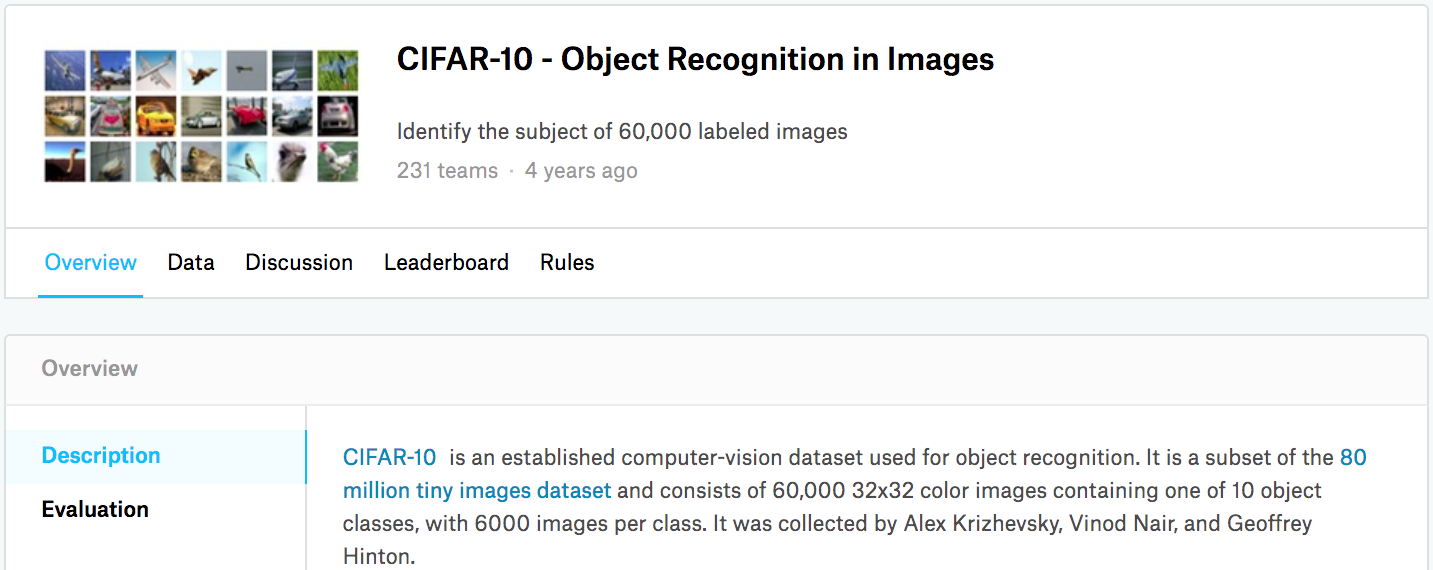
図 14.13.1 CIFAR-10 画像分類コンペティションの Web ページ情報。コンペティションのデータセットは “Data” タブをクリックして取得できる。
import collections
from d2l import torch as d2l
import math
import torch
import torchvision
from torch import nn
import os
import pandas as pd
import shutil
import collections
from d2l import mxnet as d2l
import math
from mxnet import gluon, init, npx
from mxnet.gluon import nn
import os
import pandas as pd
import shutil

npx.set_np()
#@save
d2l.DATA_HUB['cifar10_tiny'] = (d2l.DATA_URL + 'kaggle_cifar10_tiny.zip',
                                '2068874e4b9a9f0fb07ebe0ad2b29754449ccacd')

# Kaggleコンペティション用にダウンロードした全データセットを用いるなら,設定する
# `demo` to False
demo = True

if demo:
    data_dir = d2l.download_extract('cifar10_tiny')
else:
    data_dir = '../data/cifar-10/'
#@save
d2l.DATA_HUB['cifar10_tiny'] = (d2l.DATA_URL + 'kaggle_cifar10_tiny.zip',
                                '2068874e4b9a9f0fb07ebe0ad2b29754449ccacd')

# Kaggleコンペティション用にダウンロードした全データセットを用いるなら,設定する
# `demo` to False
demo = True

if demo:
    data_dir = d2l.download_extract('cifar10_tiny')
else:
    data_dir = '../data/cifar-10/'
14.13.1. データセットの取得と整理
コンペティションのデータセットは 訓練セットとテストセットに分かれており、 それぞれ 50000 枚と 300000 枚の画像を含む。 テストセットでは、 10000 枚の画像が評価に用いられ、 残りの 290000 枚の画像は評価されない。
テストセットの結果を手作業でラベル付けしたものを使って 不正に解答することを難しくするために 含まれている。 このデータセットの画像はすべて png 形式のカラー(RGB チャネル)画像ファイルで、 高さと幅はいずれも 32 ピクセルである。 画像は全部で 10 クラス、すなわち airplane, car, bird, cat, deer, dog, frog, horse, boat, truck を含む。 図 14.13.1 の左上には、データセット中の airplane, car, bird の画像がいくつか示されている。
14.13.1.1. データセットのダウンロード
Kaggle にログインした後、 図 14.13.1 に示した
CIFAR-10 画像分類コンペティションの Web ページで “Data”
タブをクリックし、“Download All”
ボタンを押してデータセットをダウンロードできる。
ダウンロードしたファイルを ../data に解凍し、その中の train.7z
と test.7z をさらに解凍すると、データセット全体は次のパスにある。
../data/cifar-10/train/[1-50000].png../data/cifar-10/test/[1-300000].png../data/cifar-10/trainLabels.csv../data/cifar-10/sampleSubmission.csv
ここで train と test
ディレクトリにはそれぞれ訓練画像とテスト画像が含まれ、trainLabels.csv
は訓練画像のラベルを提供し、sample_submission.csv
は提出用のサンプルファイルである。
始めやすくするために、データセットの小規模サンプルを提供する。最初の
1000 枚の訓練画像と、ランダムに選んだ 5 枚のテスト画像を含む。 Kaggle
コンペティションの完全なデータセットを使うには、次の demo 変数を
False に設定する必要がある。
#@save
d2l.DATA_HUB['cifar10_tiny'] = (d2l.DATA_URL + 'kaggle_cifar10_tiny.zip',
                                '2068874e4b9a9f0fb07ebe0ad2b29754449ccacd')

# Kaggleコンペティション用にダウンロードした全データセットを用いるなら,設定する
# `demo` to False
demo = True

if demo:
    data_dir = d2l.download_extract('cifar10_tiny')
else:
    data_dir = '../data/cifar-10/'
Downloading ../data/kaggle_cifar10_tiny.zip from http://d2l-data.s3-accelerate.amazonaws.com/kaggle_cifar10_tiny.zip...
#@save
d2l.DATA_HUB['cifar10_tiny'] = (d2l.DATA_URL + 'kaggle_cifar10_tiny.zip',
                                '2068874e4b9a9f0fb07ebe0ad2b29754449ccacd')

# Kaggleコンペティション用にダウンロードした全データセットを用いるなら,設定する
# `demo` to False
demo = True

if demo:
    data_dir = d2l.download_extract('cifar10_tiny')
else:
    data_dir = '../data/cifar-10/'
Downloading ../data/kaggle_cifar10_tiny.zip from http://d2l-data.s3-accelerate.amazonaws.com/kaggle_cifar10_tiny.zip...
#@save
def read_csv_labels(fname):
    """Read `fname` to return a filename to label dictionary."""
    with open(fname, 'r') as f:
        # ファイル先頭行(列名)をスキップする
        lines = f.readlines()[1:]
    tokens = [l.rstrip().split(',') for l in lines]
    return dict(((name, label) for name, label in tokens))

labels = read_csv_labels(os.path.join(data_dir, 'trainLabels.csv'))
print('# 訓練例の数:', len(labels))
print('# クラス数:', len(set(labels.values())))
#@save
def read_csv_labels(fname):
    """Read `fname` to return a filename to label dictionary."""
    with open(fname, 'r') as f:
        # ファイル先頭行(列名)をスキップする
        lines = f.readlines()[1:]
    tokens = [l.rstrip().split(',') for l in lines]
    return dict(((name, label) for name, label in tokens))

labels = read_csv_labels(os.path.join(data_dir, 'trainLabels.csv'))
print('# 訓練例の数:', len(labels))
print('# クラス数:', len(set(labels.values())))
14.13.1.2. データセットの整理
モデルの訓練とテストを容易にするために、データセットを整理する必要がある。 まず csv ファイルからラベルを読み込みよう。 次の関数は、拡張子を除いたファイル名をそのラベルに対応付ける辞書を返す。
#@save
def read_csv_labels(fname):
    """Read `fname` to return a filename to label dictionary."""
    with open(fname, 'r') as f:
        # ファイル先頭行(列名)をスキップする
        lines = f.readlines()[1:]
    tokens = [l.rstrip().split(',') for l in lines]
    return dict(((name, label) for name, label in tokens))

labels = read_csv_labels(os.path.join(data_dir, 'trainLabels.csv'))
print('# 訓練例の数:', len(labels))
print('# クラス数:', len(set(labels.values())))
# training examples: 1000
# classes: 10
#@save
def read_csv_labels(fname):
    """Read `fname` to return a filename to label dictionary."""
    with open(fname, 'r') as f:
        # ファイル先頭行(列名)をスキップする
        lines = f.readlines()[1:]
    tokens = [l.rstrip().split(',') for l in lines]
    return dict(((name, label) for name, label in tokens))

labels = read_csv_labels(os.path.join(data_dir, 'trainLabels.csv'))
print('# 訓練例の数:', len(labels))
print('# クラス数:', len(set(labels.values())))
# training examples: 1000
# classes: 10
#@save
def copyfile(filename, target_dir):
    """Copy a file into a target directory."""
    os.makedirs(target_dir, exist_ok=True)
    shutil.copy(filename, target_dir)

#@save
def reorg_train_valid(data_dir, labels, valid_ratio):
    """Split the validation set out of the original training set."""
    # 最も少ない例を持つクラスの例数
    # 訓練データセット
    n = collections.Counter(labels.values()).most_common()[-1][1]
    # 検証セットの各クラスのサンプル数
    n_valid_per_label = max(1, math.floor(n * valid_ratio))
    label_count = {}
    for train_file in os.listdir(os.path.join(data_dir, 'train')):
        label = labels[train_file.split('.')[0]]
        fname = os.path.join(data_dir, 'train', train_file)
        copyfile(fname, os.path.join(data_dir, 'train_valid_test',
                                     'train_valid', label))
        if label not in label_count or label_count[label] < n_valid_per_label:
            copyfile(fname, os.path.join(data_dir, 'train_valid_test',
                                         'valid', label))
            label_count[label] = label_count.get(label, 0) + 1
        else:
            copyfile(fname, os.path.join(data_dir, 'train_valid_test',
                                         'train', label))
    return n_valid_per_label
#@save
def copyfile(filename, target_dir):
    """Copy a file into a target directory."""
    os.makedirs(target_dir, exist_ok=True)
    shutil.copy(filename, target_dir)

#@save
def reorg_train_valid(data_dir, labels, valid_ratio):
    """Split the validation set out of the original training set."""
    # 最も少ない例を持つクラスの例数
    # 訓練データセット
    n = collections.Counter(labels.values()).most_common()[-1][1]
    # 検証セットの各クラスのサンプル数
    n_valid_per_label = max(1, math.floor(n * valid_ratio))
    label_count = {}
    for train_file in os.listdir(os.path.join(data_dir, 'train')):
        label = labels[train_file.split('.')[0]]
        fname = os.path.join(data_dir, 'train', train_file)
        copyfile(fname, os.path.join(data_dir, 'train_valid_test',
                                     'train_valid', label))
        if label not in label_count or label_count[label] < n_valid_per_label:
            copyfile(fname, os.path.join(data_dir, 'train_valid_test',
                                         'valid', label))
            label_count[label] = label_count.get(label, 0) + 1
        else:
            copyfile(fname, os.path.join(data_dir, 'train_valid_test',
                                         'train', label))
    return n_valid_per_label
次に、reorg_train_valid
関数を定義して、元の訓練セットから検証セットを分割して取り出す。
この関数の引数 valid_ratio
は、検証セットの例数と元の訓練セットの例数の比率である。
より具体的には、 最も例数の少ないクラスの画像数を \(n\)、比率を
\(r\) とすると、 検証セットは各クラスから
\(\max(\lfloor nr\rfloor,1)\) 枚の画像を分割して取り出す。 例として
valid_ratio=0.1 を使いよう。元の訓練セットには 50000
枚の画像があるので、 train_valid_test/train には 45000
枚の画像が訓練用として使われ、 残りの 5000 枚は
train_valid_test/valid に検証セットとして分割される。
データセットを整理した後は、同じクラスの画像が同じフォルダの下に配置される。
#@save
def copyfile(filename, target_dir):
    """Copy a file into a target directory."""
    os.makedirs(target_dir, exist_ok=True)
    shutil.copy(filename, target_dir)

#@save
def reorg_train_valid(data_dir, labels, valid_ratio):
    """Split the validation set out of the original training set."""
    # 最も少ない例を持つクラスの例数
    # 訓練データセット
    n = collections.Counter(labels.values()).most_common()[-1][1]
    # 検証セットの各クラスのサンプル数
    n_valid_per_label = max(1, math.floor(n * valid_ratio))
    label_count = {}
    for train_file in os.listdir(os.path.join(data_dir, 'train')):
        label = labels[train_file.split('.')[0]]
        fname = os.path.join(data_dir, 'train', train_file)
        copyfile(fname, os.path.join(data_dir, 'train_valid_test',
                                     'train_valid', label))
        if label not in label_count or label_count[label] < n_valid_per_label:
            copyfile(fname, os.path.join(data_dir, 'train_valid_test',
                                         'valid', label))
            label_count[label] = label_count.get(label, 0) + 1
        else:
            copyfile(fname, os.path.join(data_dir, 'train_valid_test',
                                         'train', label))
    return n_valid_per_label
#@save
def copyfile(filename, target_dir):
    """Copy a file into a target directory."""
    os.makedirs(target_dir, exist_ok=True)
    shutil.copy(filename, target_dir)

#@save
def reorg_train_valid(data_dir, labels, valid_ratio):
    """Split the validation set out of the original training set."""
    # 最も少ない例を持つクラスの例数
    # 訓練データセット
    n = collections.Counter(labels.values()).most_common()[-1][1]
    # 検証セットの各クラスのサンプル数
    n_valid_per_label = max(1, math.floor(n * valid_ratio))
    label_count = {}
    for train_file in os.listdir(os.path.join(data_dir, 'train')):
        label = labels[train_file.split('.')[0]]
        fname = os.path.join(data_dir, 'train', train_file)
        copyfile(fname, os.path.join(data_dir, 'train_valid_test',
                                     'train_valid', label))
        if label not in label_count or label_count[label] < n_valid_per_label:
            copyfile(fname, os.path.join(data_dir, 'train_valid_test',
                                         'valid', label))
            label_count[label] = label_count.get(label, 0) + 1
        else:
            copyfile(fname, os.path.join(data_dir, 'train_valid_test',
                                         'train', label))
    return n_valid_per_label
#@save
def reorg_test(data_dir):
    """Organize the testing set for data loading during prediction."""
    for test_file in os.listdir(os.path.join(data_dir, 'test')):
        copyfile(os.path.join(data_dir, 'test', test_file),
                 os.path.join(data_dir, 'train_valid_test', 'test',
                              'unknown'))
#@save
def reorg_test(data_dir):
    """Organize the testing set for data loading during prediction."""
    for test_file in os.listdir(os.path.join(data_dir, 'test')):
        copyfile(os.path.join(data_dir, 'test', test_file),
                 os.path.join(data_dir, 'train_valid_test', 'test',
                              'unknown'))
以下の reorg_test
関数は、予測時のデータ読み込みのためにテストセットを整理する。
#@save
def reorg_test(data_dir):
    """Organize the testing set for data loading during prediction."""
    for test_file in os.listdir(os.path.join(data_dir, 'test')):
        copyfile(os.path.join(data_dir, 'test', test_file),
                 os.path.join(data_dir, 'train_valid_test', 'test',
                              'unknown'))
#@save
def reorg_test(data_dir):
    """Organize the testing set for data loading during prediction."""
    for test_file in os.listdir(os.path.join(data_dir, 'test')):
        copyfile(os.path.join(data_dir, 'test', test_file),
                 os.path.join(data_dir, 'train_valid_test', 'test',
                              'unknown'))
def reorg_cifar10_data(data_dir, valid_ratio):
    labels = read_csv_labels(os.path.join(data_dir, 'trainLabels.csv'))
    reorg_train_valid(data_dir, labels, valid_ratio)
    reorg_test(data_dir)
def reorg_cifar10_data(data_dir, valid_ratio):
    labels = read_csv_labels(os.path.join(data_dir, 'trainLabels.csv'))
    reorg_train_valid(data_dir, labels, valid_ratio)
    reorg_test(data_dir)
最後に、上で定義した
read_csv_labels、reorg_train_valid、reorg_test関数を呼び出すための関数を使う。
def reorg_cifar10_data(data_dir, valid_ratio):
    labels = read_csv_labels(os.path.join(data_dir, 'trainLabels.csv'))
    reorg_train_valid(data_dir, labels, valid_ratio)
    reorg_test(data_dir)
def reorg_cifar10_data(data_dir, valid_ratio):
    labels = read_csv_labels(os.path.join(data_dir, 'trainLabels.csv'))
    reorg_train_valid(data_dir, labels, valid_ratio)
    reorg_test(data_dir)
batch_size = 32 if demo else 128
valid_ratio = 0.1
reorg_cifar10_data(data_dir, valid_ratio)
batch_size = 32 if demo else 128
valid_ratio = 0.1
reorg_cifar10_data(data_dir, valid_ratio)
ここでは、データセットの小規模サンプルに対してバッチサイズを 32
に設定している。 Kaggle
コンペティションの完全なデータセットで訓練・テストする場合は、
batch_size は 128 のようなより大きい整数に設定すべきである。
ハイパーパラメータ調整のために、訓練例の 10%
を検証セットとして分割する。
batch_size = 32 if demo else 128
valid_ratio = 0.1
reorg_cifar10_data(data_dir, valid_ratio)
14.13.2. 画像拡張
過学習に対処するために画像拡張を用いる。 たとえば、訓練中に画像をランダムに左右反転できる。 また、カラー画像の 3 つの RGB チャネルに対して標準化を行うこともできる。以下に、調整可能な操作のいくつかを示す。
transform_train = torchvision.transforms.Compose([
    # 画像を高さ・幅ともに40ピクセルの正方形に拡大する
    torchvision.transforms.Resize(40),
    # 高さと幅がともに40ピクセルの正方形画像をランダムに切り抜く
    # 元の面積の0.64倍から1倍の小さな正方形を生成する
    # 画像を32ピクセル四方にリサイズし,さらにスケールする
    # width
    torchvision.transforms.RandomResizedCrop(32, scale=(0.64, 1.0),
                                                   ratio=(1.0, 1.0)),
    torchvision.transforms.RandomHorizontalFlip(),
    torchvision.transforms.ToTensor(),
    # 画像の各チャネルを標準化する
    torchvision.transforms.Normalize([0.4914, 0.4822, 0.4465],
                                     [0.2023, 0.1994, 0.2010])])
transform_train = gluon.data.vision.transforms.Compose([
    # 画像を高さ・幅ともに40ピクセルの正方形に拡大する
    gluon.data.vision.transforms.Resize(40),
    # 高さと幅がともに40ピクセルの正方形画像をランダムに切り抜く
    # 元の面積の0.64倍から1倍の小さな正方形を生成する
    # 画像を32ピクセル四方にリサイズし,さらにスケールする
    # width
    gluon.data.vision.transforms.RandomResizedCrop(32, scale=(0.64, 1.0),
                                                   ratio=(1.0, 1.0)),
    gluon.data.vision.transforms.RandomFlipLeftRight(),
    gluon.data.vision.transforms.ToTensor(),
    # 画像の各チャネルを標準化する
    gluon.data.vision.transforms.Normalize([0.4914, 0.4822, 0.4465],
                                           [0.2023, 0.1994, 0.2010])])
テスト時には、 評価結果にランダム性が入らないように、 画像の標準化のみを行う。
transform_test = torchvision.transforms.Compose([
    torchvision.transforms.ToTensor(),
    torchvision.transforms.Normalize([0.4914, 0.4822, 0.4465],
                                     [0.2023, 0.1994, 0.2010])])
transform_test = gluon.data.vision.transforms.Compose([
    gluon.data.vision.transforms.ToTensor(),
    gluon.data.vision.transforms.Normalize([0.4914, 0.4822, 0.4465],
                                           [0.2023, 0.1994, 0.2010])])
14.13.3. データセットの読み込み
次に、整理済みの生画像ファイルからなるデータセットを読み込みます。各例は画像とラベルを含む。
train_ds, train_valid_ds = [torchvision.datasets.ImageFolder(
    os.path.join(data_dir, 'train_valid_test', folder),
    transform=transform_train) for folder in ['train', 'train_valid']]

valid_ds, test_ds = [torchvision.datasets.ImageFolder(
    os.path.join(data_dir, 'train_valid_test', folder),
    transform=transform_test) for folder in ['valid', 'test']]
train_ds, valid_ds, train_valid_ds, test_ds = [
    gluon.data.vision.ImageFolderDataset(
        os.path.join(data_dir, 'train_valid_test', folder))
    for folder in ['train', 'valid', 'train_valid', 'test']]
訓練中には、 上で定義したすべての画像拡張操作を指定する必要がある。 検証セットを ハイパーパラメータ調整中のモデル評価に用いるときは、 画像拡張によるランダム性を入れてはいけない。 最終予測の前には、 すべてのラベル付きデータを最大限に活用するために、 訓練セットと検証セットを結合したデータでモデルを再訓練する。
train_iter, train_valid_iter = [torch.utils.data.DataLoader(
    dataset, batch_size, shuffle=True, drop_last=True)
    for dataset in (train_ds, train_valid_ds)]

valid_iter = torch.utils.data.DataLoader(valid_ds, batch_size, shuffle=False,
                                         drop_last=True)

test_iter = torch.utils.data.DataLoader(test_ds, batch_size, shuffle=False,
                                        drop_last=False)
train_iter, train_valid_iter = [gluon.data.DataLoader(
    dataset.transform_first(transform_train), batch_size, shuffle=True,
    last_batch='discard') for dataset in (train_ds, train_valid_ds)]

valid_iter = gluon.data.DataLoader(
    valid_ds.transform_first(transform_test), batch_size, shuffle=False,
    last_batch='discard')

test_iter = gluon.data.DataLoader(
    test_ds.transform_first(transform_test), batch_size, shuffle=False,
    last_batch='keep')
14.13.4. モデルの定義
8.6 章 で説明した ResNet-18 モデルを定義する。
def get_net():
    num_classes = 10
    net = d2l.resnet18(num_classes, 3)
    return net

loss = nn.CrossEntropyLoss(reduction="none")
class Residual(nn.HybridBlock):
    def __init__(self, num_channels, use_1x1conv=False, strides=1, **kwargs):
        super(Residual, self).__init__(**kwargs)
        self.conv1 = nn.Conv2D(num_channels, kernel_size=3, padding=1,
                               strides=strides)
        self.conv2 = nn.Conv2D(num_channels, kernel_size=3, padding=1)
        if use_1x1conv:
            self.conv3 = nn.Conv2D(num_channels, kernel_size=1,
                                   strides=strides)
        else:
            self.conv3 = None
        self.bn1 = nn.BatchNorm()
        self.bn2 = nn.BatchNorm()

    def hybrid_forward(self, F, X):
        Y = F.npx.relu(self.bn1(self.conv1(X)))
        Y = self.bn2(self.conv2(Y))
        if self.conv3:
            X = self.conv3(X)
        return F.npx.relu(Y + X)
14.13.5. 訓練関数の定義
モデルの検証セット上での性能に基づいて、モデルを選択し、ハイパーパラメータを調整する。
以下では、モデル訓練関数 train を定義する。
def train(net, train_iter, valid_iter, num_epochs, lr, wd, devices, lr_period,
          lr_decay):
    trainer = torch.optim.SGD(net.parameters(), lr=lr, momentum=0.9,
                              weight_decay=wd)
    scheduler = torch.optim.lr_scheduler.StepLR(trainer, lr_period, lr_decay)
    num_batches, timer = len(train_iter), d2l.Timer()
    legend = ['train loss', 'train acc']
    if valid_iter is not None:
        legend.append('valid acc')
    animator = d2l.Animator(xlabel='epoch', xlim=[1, num_epochs],
                            legend=legend)
    net = nn.DataParallel(net, device_ids=devices).to(devices[0])
    for epoch in range(num_epochs):
        net.train()
        metric = d2l.Accumulator(3)
        for i, (features, labels) in enumerate(train_iter):
            timer.start()
            l, acc = d2l.train_batch_ch13(net, features, labels,
                                          loss, trainer, devices)
            metric.add(l, acc, labels.shape[0])
            timer.stop()
            if (i + 1) % (num_batches // 5) == 0 or i == num_batches - 1:
                animator.add(epoch + (i + 1) / num_batches,
                             (metric[0] / metric[2], metric[1] / metric[2],
                              None))
        if valid_iter is not None:
            valid_acc = d2l.evaluate_accuracy_gpu(net, valid_iter)
            animator.add(epoch + 1, (None, None, valid_acc))
        scheduler.step()
    measures = (f'train loss {metric[0] / metric[2]:.3f}, '
                f'train acc {metric[1] / metric[2]:.3f}')
    if valid_iter is not None:
        measures += f', valid acc {valid_acc:.3f}'
    print(measures + f'\n{metric[2] * num_epochs / timer.sum():.1f}'
          f' examples/sec on {str(devices)}')
def resnet18(num_classes):
    net = nn.HybridSequential()
    net.add(nn.Conv2D(64, kernel_size=3, strides=1, padding=1),
            nn.BatchNorm(), nn.Activation('relu'))

    def resnet_block(num_channels, num_residuals, first_block=False):
        blk = nn.HybridSequential()
        for i in range(num_residuals):
            if i == 0 and not first_block:
                blk.add(Residual(num_channels, use_1x1conv=True, strides=2))
            else:
                blk.add(Residual(num_channels))
        return blk

    net.add(resnet_block(64, 2, first_block=True),
            resnet_block(128, 2),
            resnet_block(256, 2),
            resnet_block(512, 2))
    net.add(nn.GlobalAvgPool2D(), nn.Dense(num_classes))
    return net
14.13.6. モデルの訓練と検証
これで、モデルを訓練し検証できる。
以下のハイパーパラメータはすべて調整可能である。
たとえば、エポック数を増やすことができる。 lr_period と lr_decay
をそれぞれ 4 と 0.9 に設定すると、最適化アルゴリズムの学習率は 4
エポックごとに 0.9 倍される。説明の便宜上、 ここでは 20
エポックだけ訓練する。
devices, num_epochs, lr, wd = d2l.try_all_gpus(), 20, 2e-4, 5e-4
lr_period, lr_decay, net = 4, 0.9, get_net()
net(next(iter(train_iter))[0])
train(net, train_iter, valid_iter, num_epochs, lr, wd, devices, lr_period,
      lr_decay)
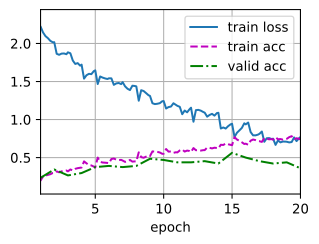
train loss 0.771, train acc 0.740, valid acc 0.359
986.7 examples/sec on [device(type='cuda', index=0), device(type='cuda', index=1)]
def get_net(devices):
    num_classes = 10
    net = resnet18(num_classes)
    net.initialize(ctx=devices, init=init.Xavier())
    return net

loss = gluon.loss.SoftmaxCrossEntropyLoss()
14.13.7. テストセットの分類と Kaggle への結果提出
ハイパーパラメータを調整して有望なモデルを得たら、 すべてのラベル付きデータ(検証セットを含む)を使ってモデルを再訓練し、テストセットを分類する。
net, preds = get_net(), []
net(next(iter(train_valid_iter))[0])
train(net, train_valid_iter, None, num_epochs, lr, wd, devices, lr_period,
      lr_decay)

for X, _ in test_iter:
    y_hat = net(X.to(devices[0]))
    preds.extend(y_hat.argmax(dim=1).type(torch.int32).cpu().numpy())
sorted_ids = list(range(1, len(test_ds) + 1))
sorted_ids.sort(key=lambda x: str(x))
df = pd.DataFrame({'id': sorted_ids, 'label': preds})
df['label'] = df['label'].apply(lambda x: train_valid_ds.classes[x])
df.to_csv('submission.csv', index=False)
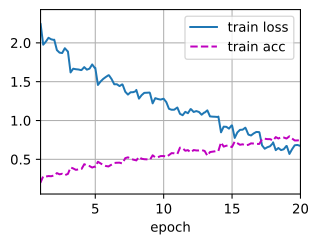
train loss 0.676, train acc 0.746
1136.6 examples/sec on [device(type='cuda', index=0), device(type='cuda', index=1)]
def train(net, train_iter, valid_iter, num_epochs, lr, wd, devices, lr_period,
          lr_decay):
    trainer = gluon.Trainer(net.collect_params(), 'sgd',
                            {'learning_rate': lr, 'momentum': 0.9, 'wd': wd})
    num_batches, timer = len(train_iter), d2l.Timer()
    legend = ['train loss', 'train acc']
    if valid_iter is not None:
        legend.append('valid acc')
    animator = d2l.Animator(xlabel='epoch', xlim=[1, num_epochs],
                            legend=legend)
    for epoch in range(num_epochs):
        metric = d2l.Accumulator(3)
        if epoch > 0 and epoch % lr_period == 0:
            trainer.set_learning_rate(trainer.learning_rate * lr_decay)
        for i, (features, labels) in enumerate(train_iter):
            timer.start()
            l, acc = d2l.train_batch_ch13(
                net, features, labels.astype('float32'), loss, trainer,
                devices, d2l.split_batch)
            metric.add(l, acc, labels.shape[0])
            timer.stop()
            if (i + 1) % (num_batches // 5) == 0 or i == num_batches - 1:
                animator.add(epoch + (i + 1) / num_batches,
                             (metric[0] / metric[2], metric[1] / metric[2],
                              None))
        if valid_iter is not None:
            valid_acc = d2l.evaluate_accuracy_gpus(net, valid_iter,
                                                   d2l.split_batch)
            animator.add(epoch + 1, (None, None, valid_acc))
    measures = (f'train loss {metric[0] / metric[2]:.3f}, '
                f'train acc {metric[1] / metric[2]:.3f}')
    if valid_iter is not None:
        measures += f', valid acc {valid_acc:.3f}'
    print(measures + f'\n{metric[2] * num_epochs / timer.sum():.1f}'
          f' examples/sec on {str(devices)}')
上のコードは submission.csv ファイルを生成する。 その形式は Kaggle
コンペティションの要件を満たしている。 Kaggle への結果提出方法は
5.7 章 の場合と似ている。
14.13.8. まとめ
生の画像ファイルを必要な形式に整理すれば、それらを含むデータセットを読み込める。
画像分類コンペティションでは、畳み込みニューラルネットワークと画像拡張を利用できる。
14.13.9. 演習
この Kaggle コンペティションで CIFAR-10 の完全なデータセットを使いなさい。ハイパーパラメータを
batch_size = 128,num_epochs = 100,lr = 0.1,lr_period = 50,lr_decay = 0.1に設定しなさい。このコンペティションでどの程度の精度と順位を達成できるか調べなさい。さらに改善できるか?画像拡張を使わない場合、どの程度の精度が得られるか?