
14.4. アンカーボックスとは
アンカーボックス(Anchor Box)とは、物体検出アルゴリズムにおいて、あらかじめ定義された様々なアスペクト比とスケールを持つ複数の基準となる矩形(バウンディングボックス)のことである。
物体検出アルゴリズムは通常、 入力画像内の多数の領域をサンプリングし、それらの領域に注目対象の物体が含まれているかを判定し、さらに領域の境界を調整して、物体の 真のバウンディングボックス をより正確に予測する。 モデルによって、領域のサンプリング方法は さまざまである。 ここではそのような方法の一つを紹介する。 これは、各ピクセルを中心として、異なるスケールとアスペクト比をもつ複数のバウンディングボックスを生成する。 これらのバウンディングボックスを アンカーボックス と呼ぶ。 14.7 章 では、アンカーボックスに基づく物体検出モデルを設計する。
まず、出力をより簡潔にするために、 表示精度を少し変更しよう。
%matplotlib inline
from d2l import torch as d2l
import torch

torch.set_printoptions(2)  # 表示精度を簡略化
%matplotlib inline
from d2l import mxnet as d2l
from mxnet import gluon, image, np, npx

np.set_printoptions(2)  # 表示精度を簡略化
npx.set_np()
boxes = Y.reshape(h, w, 5, 4)
boxes[250, 250, 0, :]
boxes = Y.reshape(h, w, 5, 4)
boxes[250, 250, 0, :]
14.4.1. 複数のアンカーボックスの生成
入力画像の高さが \(h\)、幅が \(w\) であるとする。 画像の各ピクセルを中心として、異なる形状のアンカーボックスを生成する。 スケール を \(s\in (0, 1]\)、 アスペクト比(幅と高さの比)を \(r > 0\) とする。 すると、アンカーボックスの幅と高さはそれぞれ \(ws\sqrt{r}\) と \(hs/\sqrt{r}\) になる。 中心位置が与えられれば、幅と高さが既知のアンカーボックスは一意に定まることに注意しよう。
異なる形状の複数のアンカーボックスを生成するために、 一連のスケール \(s_1,\ldots, s_n\) と 一連のアスペクト比 \(r_1,\ldots, r_m\) を設定する。 各ピクセルを中心として、これらのスケールとアスペクト比の全組合せを用いると、入力画像には合計 \(whnm\) 個のアンカーボックスが生成される。これらのアンカーボックスはすべての 真のバウンディングボックスを覆えるかもしれないが、計算量が容易に高くなりすぎる。 実際には、 \(s_1\) または \(r_1\) を含む組合せだけを考慮する ことができる。
つまり、同じピクセルを中心とするアンカーボックスの数は \(n+m-1\) である。入力画像全体では、合計 \(wh(n+m-1)\) 個のアンカーボックスを生成する。
上記のアンカーボックス生成方法は、次の multibox_prior
関数で実装されている。入力画像、スケールのリスト、アスペクト比のリストを指定すると、この関数はすべてのアンカーボックスを返す。
#@save
def multibox_prior(data, sizes, ratios):
    """Generate anchor boxes with different shapes centered on each pixel."""
    in_height, in_width = data.shape[-2:]
    device, num_sizes, num_ratios = data.device, len(sizes), len(ratios)
    boxes_per_pixel = (num_sizes + num_ratios - 1)
    size_tensor = d2l.tensor(sizes, device=device)
    ratio_tensor = d2l.tensor(ratios, device=device)
    # オフセットはアンカーをピクセルの中心へ移動させるために必要である。なお
    # 1ピクセルは高さ=1、幅=1であり、中心を0.5だけずらすことにする
    offset_h, offset_w = 0.5, 0.5
    steps_h = 1.0 / in_height  # y軸のスケール付き目盛り
    steps_w = 1.0 / in_width  # x軸のスケールを調整したステップ数

    # アンカーボックスのすべての中心点を生成する
    center_h = (torch.arange(in_height, device=device) + offset_h) * steps_h
    center_w = (torch.arange(in_width, device=device) + offset_w) * steps_w
    shift_y, shift_x = torch.meshgrid(center_h, center_w, indexing='ij')
    shift_y, shift_x = shift_y.reshape(-1), shift_x.reshape(-1)

    # 後で使用する `boxes_per_pixel` 個の高さと幅を生成する
    # アンカーボックスの角座標(xmin, xmax, ymin, ymax)を作成するために用いる
    w = torch.cat((size_tensor * torch.sqrt(ratio_tensor[0]),
                   sizes[0] * torch.sqrt(ratio_tensor[1:])))\
                   * in_height / in_width  # 長方形の入力を処理する
    h = torch.cat((size_tensor / torch.sqrt(ratio_tensor[0]),
                   sizes[0] / torch.sqrt(ratio_tensor[1:])))
    # 2で割って高さと幅を半分にする
    anchor_manipulations = torch.stack((-w, -h, w, h)).T.repeat(
                                        in_height * in_width, 1) / 2

    # 各中心点には `boxes_per_pixel` 個のアンカーボックスが対応するので
    # `boxes_per_pixel`回繰り返したすべてのアンカーボックス中心のグリッドを生成する
    out_grid = torch.stack([shift_x, shift_y, shift_x, shift_y],
                dim=1).repeat_interleave(boxes_per_pixel, dim=0)
    output = out_grid + anchor_manipulations
    return output.unsqueeze(0)
#@save
def multibox_prior(data, sizes, ratios):
    """Generate anchor boxes with different shapes centered on each pixel."""
    in_height, in_width = data.shape[-2:]
    device, num_sizes, num_ratios = data.ctx, len(sizes), len(ratios)
    boxes_per_pixel = (num_sizes + num_ratios - 1)
    size_tensor = d2l.tensor(sizes, ctx=device)
    ratio_tensor = d2l.tensor(ratios, ctx=device)
    # オフセットはアンカーをピクセルの中心へ移動させるために必要である。なお
    # 1ピクセルは高さ=1、幅=1であり、中心を0.5だけずらすことにする
    offset_h, offset_w = 0.5, 0.5
    steps_h = 1.0 / in_height  # y軸のスケール付きステップ
    steps_w = 1.0 / in_width  # x軸方向にスケーリングされたステップ

    # アンカーボックスのすべての中心点を生成する
    center_h = (d2l.arange(in_height, ctx=device) + offset_h) * steps_h
    center_w = (d2l.arange(in_width, ctx=device) + offset_w) * steps_w
    shift_x, shift_y = d2l.meshgrid(center_w, center_h)
    shift_x, shift_y = shift_x.reshape(-1), shift_y.reshape(-1)

    # 後で使用する `boxes_per_pixel` 個の高さと幅を生成する
    # アンカーボックスの角座標(xmin, xmax, ymin, ymax)を作成するために用いる
    w = np.concatenate((size_tensor * np.sqrt(ratio_tensor[0]),
                        sizes[0] * np.sqrt(ratio_tensor[1:]))) \
                        * in_height / in_width  # 長方形の入力を処理する
    h = np.concatenate((size_tensor / np.sqrt(ratio_tensor[0]),
                        sizes[0] / np.sqrt(ratio_tensor[1:])))
    # 2で割って高さと幅を半分にする
    anchor_manipulations = np.tile(np.stack((-w, -h, w, h)).T,
                                   (in_height * in_width, 1)) / 2

    # 各中心点には `boxes_per_pixel` 個のアンカーボックスが対応するので
    # `boxes_per_pixel`回繰り返したすべてのアンカーボックス中心のグリッドを生成する
    out_grid = d2l.stack([shift_x, shift_y, shift_x, shift_y],
                         axis=1).repeat(boxes_per_pixel, axis=0)
    output = out_grid + anchor_manipulations
    return np.expand_dims(output, axis=0)
#@save
def show_bboxes(axes, bboxes, labels=None, colors=None):
    """Show bounding boxes."""

    def make_list(obj, default_values=None):
        if obj is None:
            obj = default_values
        elif not isinstance(obj, (list, tuple)):
            obj = [obj]
        return obj

    labels = make_list(labels)
    colors = make_list(colors, ['b', 'g', 'r', 'm', 'c'])
    for i, bbox in enumerate(bboxes):
        color = colors[i % len(colors)]
        rect = d2l.bbox_to_rect(d2l.numpy(bbox), color)
        axes.add_patch(rect)
        if labels and len(labels) > i:
            text_color = 'k' if color == 'w' else 'w'
            axes.text(rect.xy[0], rect.xy[1], labels[i],
                      va='center', ha='center', fontsize=9, color=text_color,
                      bbox=dict(facecolor=color, lw=0))
#@save
def show_bboxes(axes, bboxes, labels=None, colors=None):
    """Show bounding boxes."""

    def make_list(obj, default_values=None):
        if obj is None:
            obj = default_values
        elif not isinstance(obj, (list, tuple)):
            obj = [obj]
        return obj

    labels = make_list(labels)
    colors = make_list(colors, ['b', 'g', 'r', 'm', 'c'])
    for i, bbox in enumerate(bboxes):
        color = colors[i % len(colors)]
        rect = d2l.bbox_to_rect(d2l.numpy(bbox), color)
        axes.add_patch(rect)
        if labels and len(labels) > i:
            text_color = 'k' if color == 'w' else 'w'
            axes.text(rect.xy[0], rect.xy[1], labels[i],
                      va='center', ha='center', fontsize=9, color=text_color,
                      bbox=dict(facecolor=color, lw=0))
返されるアンカーボックス変数 Y の形状は、 (batch size, number of
anchor boxes, 4) である。
img = d2l.plt.imread('../img/catdog.jpg')
h, w = img.shape[:2]

print(h, w)
X = torch.rand(size=(1, 3, h, w))  # 入力データを構成する
Y = multibox_prior(X, sizes=[0.75, 0.5, 0.25], ratios=[1, 2, 0.5])
Y.shape
561 728
torch.Size([1, 2042040, 4])
img = image.imread('../img/catdog.jpg').asnumpy()
h, w = img.shape[:2]

print(h, w)
X = np.random.uniform(size=(1, 3, h, w))  # 入力データを構成する
Y = multibox_prior(X, sizes=[0.75, 0.5, 0.25], ratios=[1, 2, 0.5])
Y.shape
561 728
[07:07:29] ../src/storage/storage.cc:196: Using Pooled (Naive) StorageManager for CPU
(1, 2042040, 4)
d2l.set_figsize()
bbox_scale = d2l.tensor((w, h, w, h))
fig = d2l.plt.imshow(img)
show_bboxes(fig.axes, boxes[250, 250, :, :] * bbox_scale,
            ['s=0.75, r=1', 's=0.5, r=1', 's=0.25, r=1', 's=0.75, r=2',
             's=0.75, r=0.5'])
d2l.set_figsize()
bbox_scale = d2l.tensor((w, h, w, h))
fig = d2l.plt.imshow(img)
show_bboxes(fig.axes, boxes[250, 250, :, :] * bbox_scale,
            ['s=0.75, r=1', 's=0.5, r=1', 's=0.25, r=1', 's=0.75, r=2',
             's=0.75, r=0.5'])
アンカーボックス変数 Y の形状を (image height, image width, number
of anchor boxes centered on the same pixel, 4) に変更すると、
指定したピクセル位置を中心とするすべてのアンカーボックスを得ることができる。
以下では、 (250, 250)
を中心とする最初のアンカーボックスを参照する。4つの要素を持つ。すなわち、アンカーボックスの左上隅の
\((x, y)\) 軸座標と右下隅の \((x, y)\) 軸座標である。
両軸の座標値は、 それぞれ画像の幅と高さで割られている。
boxes = Y.reshape(h, w, 5, 4)
boxes[250, 250, 0, :]
tensor([0.06, 0.07, 0.63, 0.82])
boxes = Y.reshape(h, w, 5, 4)
boxes[250, 250, 0, :]
array([0.06, 0.07, 0.63, 0.82])
#@save
def offset_boxes(anchors, assigned_bb, eps=1e-6):
    """Transform for anchor box offsets."""
    c_anc = d2l.box_corner_to_center(anchors)
    c_assigned_bb = d2l.box_corner_to_center(assigned_bb)
    offset_xy = 10 * (c_assigned_bb[:, :2] - c_anc[:, :2]) / c_anc[:, 2:]
    offset_wh = 5 * d2l.log(eps + c_assigned_bb[:, 2:] / c_anc[:, 2:])
    offset = d2l.concat([offset_xy, offset_wh], axis=1)
    return offset
#@save
def offset_boxes(anchors, assigned_bb, eps=1e-6):
    """Transform for anchor box offsets."""
    c_anc = d2l.box_corner_to_center(anchors)
    c_assigned_bb = d2l.box_corner_to_center(assigned_bb)
    offset_xy = 10 * (c_assigned_bb[:, :2] - c_anc[:, :2]) / c_anc[:, 2:]
    offset_wh = 5 * d2l.log(eps + c_assigned_bb[:, 2:] / c_anc[:, 2:])
    offset = d2l.concat([offset_xy, offset_wh], axis=1)
    return offset
画像内の1つのピクセルを中心とするすべてのアンカーボックスを表示するために、
複数のバウンディングボックスを画像上に描画する次の show_bboxes
関数を定義する。
#@save
def show_bboxes(axes, bboxes, labels=None, colors=None):
    """Show bounding boxes."""

    def make_list(obj, default_values=None):
        if obj is None:
            obj = default_values
        elif not isinstance(obj, (list, tuple)):
            obj = [obj]
        return obj

    labels = make_list(labels)
    colors = make_list(colors, ['b', 'g', 'r', 'm', 'c'])
    for i, bbox in enumerate(bboxes):
        color = colors[i % len(colors)]
        rect = d2l.bbox_to_rect(d2l.numpy(bbox), color)
        axes.add_patch(rect)
        if labels and len(labels) > i:
            text_color = 'k' if color == 'w' else 'w'
            axes.text(rect.xy[0], rect.xy[1], labels[i],
                      va='center', ha='center', fontsize=9, color=text_color,
                      bbox=dict(facecolor=color, lw=0))
#@save
def show_bboxes(axes, bboxes, labels=None, colors=None):
    """Show bounding boxes."""

    def make_list(obj, default_values=None):
        if obj is None:
            obj = default_values
        elif not isinstance(obj, (list, tuple)):
            obj = [obj]
        return obj

    labels = make_list(labels)
    colors = make_list(colors, ['b', 'g', 'r', 'm', 'c'])
    for i, bbox in enumerate(bboxes):
        color = colors[i % len(colors)]
        rect = d2l.bbox_to_rect(d2l.numpy(bbox), color)
        axes.add_patch(rect)
        if labels and len(labels) > i:
            text_color = 'k' if color == 'w' else 'w'
            axes.text(rect.xy[0], rect.xy[1], labels[i],
                      va='center', ha='center', fontsize=9, color=text_color,
                      bbox=dict(facecolor=color, lw=0))
ground_truth = d2l.tensor([[0, 0.1, 0.08, 0.52, 0.92],
                         [1, 0.55, 0.2, 0.9, 0.88]])
anchors = d2l.tensor([[0, 0.1, 0.2, 0.3], [0.15, 0.2, 0.4, 0.4],
                    [0.63, 0.05, 0.88, 0.98], [0.66, 0.45, 0.8, 0.8],
                    [0.57, 0.3, 0.92, 0.9]])

fig = d2l.plt.imshow(img)
show_bboxes(fig.axes, ground_truth[:, 1:] * bbox_scale, ['dog', 'cat'], 'k')
show_bboxes(fig.axes, anchors * bbox_scale, ['0', '1', '2', '3', '4']);
ground_truth = d2l.tensor([[0, 0.1, 0.08, 0.52, 0.92],
                         [1, 0.55, 0.2, 0.9, 0.88]])
anchors = d2l.tensor([[0, 0.1, 0.2, 0.3], [0.15, 0.2, 0.4, 0.4],
                    [0.63, 0.05, 0.88, 0.98], [0.66, 0.45, 0.8, 0.8],
                    [0.57, 0.3, 0.92, 0.9]])

fig = d2l.plt.imshow(img)
show_bboxes(fig.axes, ground_truth[:, 1:] * bbox_scale, ['dog', 'cat'], 'k')
show_bboxes(fig.axes, anchors * bbox_scale, ['0', '1', '2', '3', '4']);
先ほど見たように、変数 boxes における \(x\) 軸と \(y\)
軸の座標値は、それぞれ画像の幅と高さで割られている。
アンカーボックスを描画する際には、 元の座標値に戻す必要がある。
そのため、以下で変数 bbox_scale を定義する。 これで、画像内の (250,
250) を中心とするすべてのアンカーボックスを描画できる。
ご覧のとおり、スケール0.75、アスペクト比1の青いアンカーボックスは、画像中の犬をうまく
囲んでいる。
d2l.set_figsize()
bbox_scale = d2l.tensor((w, h, w, h))
fig = d2l.plt.imshow(img)
show_bboxes(fig.axes, boxes[250, 250, :, :] * bbox_scale,
            ['s=0.75, r=1', 's=0.5, r=1', 's=0.25, r=1', 's=0.75, r=2',
             's=0.75, r=0.5'])

d2l.set_figsize()
bbox_scale = d2l.tensor((w, h, w, h))
fig = d2l.plt.imshow(img)
show_bboxes(fig.axes, boxes[250, 250, :, :] * bbox_scale,
            ['s=0.75, r=1', 's=0.5, r=1', 's=0.25, r=1', 's=0.75, r=2',
             's=0.75, r=0.5'])

labels[2]
labels[2]
14.4.2. Intersection over Union (IoU)
先ほど、アンカーボックスが画像中の犬を「うまく」囲んでいると述べた。 物体の真のバウンディングボックスが分かっている場合、この「うまく」はどのように定量化できるだろうか。 直感的には、 アンカーボックスと真のバウンディングボックスの類似度を測れる。 Jaccard index は2つの集合の類似度を測ることができる。集合 \(\mathcal{A}\) と \(\mathcal{B}\) に対して、その Jaccard index は、共通部分の大きさを和集合の大きさで割ったものである。
実際には、任意のバウンディングボックスのピクセル領域をピクセルの集合として考えることができる。 このようにして、2つのバウンディングボックスの類似度を、それらのピクセル集合の Jaccard index によって測定できる。2つのバウンディングボックスについて、通常はその Jaccard index を intersection over union(IoU)と呼ぶ。、 図 14.4.1 に示すように、共通部分の面積を和集合の面積で割った比である。 IoU の範囲は 0 から 1 である。 0 は2つのバウンディングボックスがまったく重なっていないことを意味し、 1 は2つのバウンディングボックスが等しいことを示す。
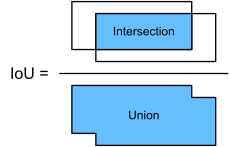
図 14.4.1 IoUは2つのバウンディングボックスの積集合の面積と和集合の面積の比率である。
この節の残りでは、IoU
を用いてアンカーボックスと真のバウンディングボックスの類似度、および異なるアンカーボックス同士の類似度を測る。
2つのアンカーまたはバウンディングボックスのリストが与えられたとき、 次の
box_iou は、これら2つのリスト間の全組合せについて IoU を計算する。
#@save
def box_iou(boxes1, boxes2):
    """Compute pairwise IoU across two lists of anchor or bounding boxes."""
    box_area = lambda boxes: ((boxes[:, 2] - boxes[:, 0]) *
                              (boxes[:, 3] - boxes[:, 1]))
    # `boxes1`, `boxes2`, `areas1`, `areas2` の形状: (boxes1の個数, 4)
    # (no. of boxes2, 4), (no. of boxes1,), (no. of boxes2,)
    areas1 = box_area(boxes1)
    areas2 = box_area(boxes2)
    # `inter_upperlefts`、`inter_lowerrights`、`inters`の形状:(数)
    # ボックス1、ボックス2の数、2)
    inter_upperlefts = torch.max(boxes1[:, None, :2], boxes2[:, :2])
    inter_lowerrights = torch.min(boxes1[:, None, 2:], boxes2[:, 2:])
    inters = (inter_lowerrights - inter_upperlefts).clamp(min=0)
    # `inter_areas` と `union_areas` の形状: (boxes1の数, boxes2の数)
    inter_areas = inters[:, :, 0] * inters[:, :, 1]
    union_areas = areas1[:, None] + areas2 - inter_areas
    return inter_areas / union_areas
#@save
def box_iou(boxes1, boxes2):
    """Compute pairwise IoU across two lists of anchor or bounding boxes."""
    box_area = lambda boxes: ((boxes[:, 2] - boxes[:, 0]) *
                              (boxes[:, 3] - boxes[:, 1]))
    # `boxes1`, `boxes2`, `areas1`, `areas2` の形状: (boxes1の個数, 4)
    # (no. of boxes2, 4), (no. of boxes1,), (no. of boxes2,)
    areas1 = box_area(boxes1)
    areas2 = box_area(boxes2)
    # `inter_upperlefts`、`inter_lowerrights`、`inters`の形状:(数)
    # ボックス1、ボックス2の数、2)
    inter_upperlefts = np.maximum(boxes1[:, None, :2], boxes2[:, :2])
    inter_lowerrights = np.minimum(boxes1[:, None, 2:], boxes2[:, 2:])
    inters = (inter_lowerrights - inter_upperlefts).clip(min=0)
    # `inter_areas` と `union_areas` の形状: (boxes1の数, boxes2の数)
    inter_areas = inters[:, :, 0] * inters[:, :, 1]
    union_areas = areas1[:, None] + areas2 - inter_areas
    return inter_areas / union_areas
labels[1]
labels[1]
14.4.3. 学習データにおけるアンカーボックスのラベル付け
学習データセットでは、 各アンカーボックスを1つの学習例とみなする。 物体検出モデルを学習するためには、 各アンカーボックスに対して クラス ラベルと オフセット ラベルが必要である。 前者はアンカーボックスに対応する物体のクラスであり、 後者はアンカーボックスに対する真のバウンディングボックスのオフセットである。 予測時には、 各画像について 複数のアンカーボックスを生成し、 すべてのアンカーボックスについてクラスとオフセットを予測し、 予測されたオフセットに従って位置を調整して予測バウンディングボックスを得て、 最後に一定の条件を満たす 予測バウンディングボックスだけを出力する。
ご存じのように、物体検出の学習データセットには、 真のバウンディングボックス の位置と、それらに囲まれた物体のクラスのラベルが付いている。 生成された任意の アンカーボックス にラベルを付けるには、 そのアンカーボックスに最も近い 割り当てられた 真のバウンディングボックスのラベル付き位置とクラスを参照する。 以下では、 アンカーボックスに最も近い真のバウンディングボックスを割り当てるアルゴリズムを説明する。
14.4.3.1. 真のバウンディングボックスをアンカーボックスに割り当てる
画像が与えられたとき、 アンカーボックスを \(A_1, A_2, \ldots, A_{n_a}\)、真のバウンディングボックスを \(B_1, B_2, \ldots, B_{n_b}\) とし、ここで \(n_a \geq n_b\) とする。 行列 \(\mathbf{X} \in \mathbb{R}^{n_a \times n_b}\) を定義し、その \(i^\textrm{th}\) 行 \(j^\textrm{th}\) 列の要素 \(x_{ij}\) をアンカーボックス \(A_i\) と真のバウンディングボックス \(B_j\) の IoU とする。アルゴリズムは次の手順からなる。
行列 \(\mathbf{X}\) の最大要素を見つけ、その行と列のインデックスをそれぞれ \(i_1\) と \(j_1\) とする。すると、真のバウンディングボックス \(B_{j_1}\) はアンカーボックス \(A_{i_1}\) に割り当てられる。、すべてのアンカーボックスと真のバウンディングボックスの組の中で \(A_{i_1}\) と \(B_{j_1}\) が最も近いからであり、直感的である。最初の割り当ての後、行列 \(\mathbf{X}\) の \({i_1}^\textrm{th}\) 行と \({j_1}^\textrm{th}\) 列のすべての要素を破棄する。
行列 \(\mathbf{X}\) に残っている要素の最大値を見つけ、その行と列のインデックスをそれぞれ \(i_2\) と \(j_2\) とする。真のバウンディングボックス \(B_{j_2}\) をアンカーボックス \(A_{i_2}\) に割り当て、行列 \(\mathbf{X}\) の \({i_2}^\textrm{th}\) 行と \({j_2}^\textrm{th}\) 列のすべての要素を破棄する。
この時点で、行列 \(\mathbf{X}\) の2つの行と2つの列の要素が破棄されている。行列 \(\mathbf{X}\) の \(n_b\) 列すべての要素が破棄されるまで続ける。この時点で、\(n_b\) 個のアンカーボックスそれぞれに真のバウンディングボックスが割り当てられている。
残りの \(n_a - n_b\) 個のアンカーボックスだけを走査する。たとえば、任意のアンカーボックス \(A_i\) について、行列 \(\mathbf{X}\) の \(i^\textrm{th}\) 行全体で \(A_i\) と最も IoU が大きい真のバウンディングボックス \(B_j\) を見つけ、この IoU があらかじめ定めたしきい値より大きい場合にのみ \(B_j\) を \(A_i\) に割り当てる。
上記のアルゴリズムを具体例で説明しよう。 図 14.4.2(左)に示すように、行列 \(\mathbf{X}\) の最大値が \(x_{23}\) だとすると、真のバウンディングボックス \(B_3\) をアンカーボックス \(A_2\) に割り当てる。 次に、行2と列3のすべての要素を破棄し、残りの要素(網掛け部分)の中で最大の \(x_{71}\) を見つけ、真のバウンディングボックス \(B_1\) をアンカーボックス \(A_7\) に割り当てる。 次に、 図 14.4.2(中央)に示すように、行7と列1のすべての要素を破棄し、残りの要素(網掛け部分)の中で最大の \(x_{54}\) を見つけ、真のバウンディングボックス \(B_4\) をアンカーボックス \(A_5\) に割り当てる。 最後に、 図 14.4.2(右)に示すように、行5と列4のすべての要素を破棄し、残りの要素(網掛け部分)の中で最大の \(x_{92}\) を見つけ、真のバウンディングボックス \(B_2\) をアンカーボックス \(A_9\) に割り当てる。 その後は、残りのアンカーボックス \(A_1, A_3, A_4, A_6, A_8\) を走査し、しきい値に従って真のバウンディングボックスを割り当てるかどうかを決めるだけである。
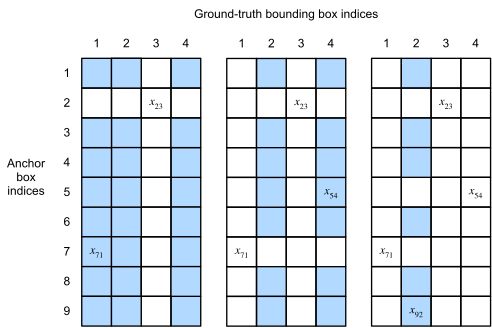
図 14.4.2 グラウンドトゥルース・バウンディングボックスをアンカーボックスに割り当てる。
このアルゴリズムは、次の assign_anchor_to_bbox
関数で実装されている。
#@save
def assign_anchor_to_bbox(ground_truth, anchors, device, iou_threshold=0.5):
    """Assign closest ground-truth bounding boxes to anchor boxes."""
    num_anchors, num_gt_boxes = anchors.shape[0], ground_truth.shape[0]
    # i行j列の要素x_ijはアンカーのIoUである
    # ボックスiと正解バウンディングボックスj
    jaccard = box_iou(anchors, ground_truth)
    # 割り当てられた正解バウンディングボックスを保持するテンソルを初期化する
    # 各アンカー
    anchors_bbox_map = torch.full((num_anchors,), -1, dtype=torch.long,
                                  device=device)
    # しきい値に従って正解バウンディングボックスを割り当てる
    max_ious, indices = torch.max(jaccard, dim=1)
    anc_i = torch.nonzero(max_ious >= iou_threshold).reshape(-1)
    box_j = indices[max_ious >= iou_threshold]
    anchors_bbox_map[anc_i] = box_j
    col_discard = torch.full((num_anchors,), -1)
    row_discard = torch.full((num_gt_boxes,), -1)
    for _ in range(num_gt_boxes):
        max_idx = torch.argmax(jaccard)  # 最大のIoUを求める
        box_idx = (max_idx % num_gt_boxes).long()
        anc_idx = (max_idx / num_gt_boxes).long()
        anchors_bbox_map[anc_idx] = box_idx
        jaccard[:, box_idx] = col_discard
        jaccard[anc_idx, :] = row_discard
    return anchors_bbox_map
#@save
def assign_anchor_to_bbox(ground_truth, anchors, device, iou_threshold=0.5):
    """Assign closest ground-truth bounding boxes to anchor boxes."""
    num_anchors, num_gt_boxes = anchors.shape[0], ground_truth.shape[0]
    # i行j列の要素x_ijはアンカーのIoUである
    # ボックスiと正解バウンディングボックスj
    jaccard = box_iou(anchors, ground_truth)
    # 割り当てられた正解バウンディングボックスを保持するテンソルを初期化する
    # 各アンカー
    anchors_bbox_map = np.full((num_anchors,), -1, dtype=np.int32, ctx=device)
    # しきい値に従って正解バウンディングボックスを割り当てる
    max_ious, indices = np.max(jaccard, axis=1), np.argmax(jaccard, axis=1)
    anc_i = np.nonzero(max_ious >= iou_threshold)[0]
    box_j = indices[max_ious >= iou_threshold]
    anchors_bbox_map[anc_i] = box_j
    col_discard = np.full((num_anchors,), -1)
    row_discard = np.full((num_gt_boxes,), -1)
    for _ in range(num_gt_boxes):
        max_idx = np.argmax(jaccard)  # 最大のIoUを求める
        box_idx = (max_idx % num_gt_boxes).astype('int32')
        anc_idx = (max_idx / num_gt_boxes).astype('int32')
        anchors_bbox_map[anc_idx] = box_idx
        jaccard[:, box_idx] = col_discard
        jaccard[anc_idx, :] = row_discard
    return anchors_bbox_map
labels[0]
labels[0]
14.4.3.2. クラスとオフセットのラベル付け
これで、各アンカーボックスのクラスとオフセットにラベルを付けることができる。アンカーボックス \(A\) に 真のバウンディングボックス \(B\) が割り当てられたとする。 一方で、 アンカーボックス \(A\) のクラスは \(B\) のクラスとしてラベル付けされる。 他方で、 アンカーボックス \(A\) のオフセットは、 \(B\) と \(A\) の中心座標の相対位置と、 これら2つのボックスの相対サイズに基づいてラベル付けされる。 データセット内のさまざまなボックスの位置とサイズが異なるため、 これらの相対位置とサイズに変換を施すことで、 より一様に分布したオフセットを得られ、 学習しやすくなる。 ここでは一般的な変換を説明する。 \(A\) と \(B\) の中心座標をそれぞれ \((x_a, y_a)\) と \((x_b, y_b)\)、 幅を \(w_a\) と \(w_b\)、 高さを \(h_a\) と \(h_b\) とする。 このとき、\(A\) のオフセットは次のようにラベル付けできる。
ここで定数のデフォルト値は
\(\mu_x = \mu_y = \mu_w = \mu_h = 0, \sigma_x=\sigma_y=0.1\), および
\(\sigma_w=\sigma_h=0.2\) である。 この変換は以下の offset_boxes
関数で実装されている。
#@save
def offset_boxes(anchors, assigned_bb, eps=1e-6):
    """Transform for anchor box offsets."""
    c_anc = d2l.box_corner_to_center(anchors)
    c_assigned_bb = d2l.box_corner_to_center(assigned_bb)
    offset_xy = 10 * (c_assigned_bb[:, :2] - c_anc[:, :2]) / c_anc[:, 2:]
    offset_wh = 5 * d2l.log(eps + c_assigned_bb[:, 2:] / c_anc[:, 2:])
    offset = d2l.concat([offset_xy, offset_wh], axis=1)
    return offset
#@save
def offset_boxes(anchors, assigned_bb, eps=1e-6):
    """Transform for anchor box offsets."""
    c_anc = d2l.box_corner_to_center(anchors)
    c_assigned_bb = d2l.box_corner_to_center(assigned_bb)
    offset_xy = 10 * (c_assigned_bb[:, :2] - c_anc[:, :2]) / c_anc[:, 2:]
    offset_wh = 5 * d2l.log(eps + c_assigned_bb[:, 2:] / c_anc[:, 2:])
    offset = d2l.concat([offset_xy, offset_wh], axis=1)
    return offset
#@save
def offset_inverse(anchors, offset_preds):
    """Predict bounding boxes based on anchor boxes with predicted offsets."""
    anc = d2l.box_corner_to_center(anchors)
    pred_bbox_xy = (offset_preds[:, :2] * anc[:, 2:] / 10) + anc[:, :2]
    pred_bbox_wh = d2l.exp(offset_preds[:, 2:] / 5) * anc[:, 2:]
    pred_bbox = d2l.concat((pred_bbox_xy, pred_bbox_wh), axis=1)
    predicted_bbox = d2l.box_center_to_corner(pred_bbox)
    return predicted_bbox
#@save
def offset_inverse(anchors, offset_preds):
    """Predict bounding boxes based on anchor boxes with predicted offsets."""
    anc = d2l.box_corner_to_center(anchors)
    pred_bbox_xy = (offset_preds[:, :2] * anc[:, 2:] / 10) + anc[:, :2]
    pred_bbox_wh = d2l.exp(offset_preds[:, 2:] / 5) * anc[:, 2:]
    pred_bbox = d2l.concat((pred_bbox_xy, pred_bbox_wh), axis=1)
    predicted_bbox = d2l.box_center_to_corner(pred_bbox)
    return predicted_bbox
アンカーボックスに真のバウンディングボックスが割り当てられていない場合、そのアンカーボックスのクラスは単に「背景」とラベル付けする。
クラスが背景であるアンカーボックスはしばしば 負例
アンカーボックスと呼ばれ、 それ以外は 正例
アンカーボックスと呼ばれる。 以下の multibox_target 関数を実装して、
真のバウンディングボックス(labels
引数)を用いて、アンカーボックス(anchors
引数)のクラスとオフセットにラベルを付けます。
この関数では背景クラスを0とし、新しいクラスの整数インデックスは1から始める。
#@save
def multibox_target(anchors, labels):
    """Label anchor boxes using ground-truth bounding boxes."""
    batch_size, anchors = labels.shape[0], anchors.squeeze(0)
    batch_offset, batch_mask, batch_class_labels = [], [], []
    device, num_anchors = anchors.device, anchors.shape[0]
    for i in range(batch_size):
        label = labels[i, :, :]
        anchors_bbox_map = assign_anchor_to_bbox(
            label[:, 1:], anchors, device)
        bbox_mask = ((anchors_bbox_map >= 0).float().unsqueeze(-1)).repeat(
            1, 4)
        # クラスラベルと割り当て済みのバウンディングボックス座標を初期化する
        # zeros
        class_labels = torch.zeros(num_anchors, dtype=torch.long,
                                   device=device)
        assigned_bb = torch.zeros((num_anchors, 4), dtype=torch.float32,
                                  device=device)
        # 割り当てられた真値でアンカーボックスのラベルクラスを付与する
        # バウンディングボックス。アンカー・ボックスに割り当てられない場合は、そのラベルを付ける
        # 背景としてのクラス(値は0のまま)
        indices_true = torch.nonzero(anchors_bbox_map >= 0)
        bb_idx = anchors_bbox_map[indices_true]
        class_labels[indices_true] = label[bb_idx, 0].long() + 1
        assigned_bb[indices_true] = label[bb_idx, 1:]
        # オフセット変換
        offset = offset_boxes(anchors, assigned_bb) * bbox_mask
        batch_offset.append(offset.reshape(-1))
        batch_mask.append(bbox_mask.reshape(-1))
        batch_class_labels.append(class_labels)
    bbox_offset = torch.stack(batch_offset)
    bbox_mask = torch.stack(batch_mask)
    class_labels = torch.stack(batch_class_labels)
    return (bbox_offset, bbox_mask, class_labels)
#@save
def multibox_target(anchors, labels):
    """Label anchor boxes using ground-truth bounding boxes."""
    batch_size, anchors = labels.shape[0], anchors.squeeze(0)
    batch_offset, batch_mask, batch_class_labels = [], [], []
    device, num_anchors = anchors.ctx, anchors.shape[0]
    for i in range(batch_size):
        label = labels[i, :, :]
        anchors_bbox_map = assign_anchor_to_bbox(
            label[:, 1:], anchors, device)
        bbox_mask = np.tile((np.expand_dims((anchors_bbox_map >= 0),
                                            axis=-1)), (1, 4)).astype('int32')
        # クラスラベルと割り当て済みのバウンディングボックス座標を初期化する
        # zeros
        class_labels = d2l.zeros(num_anchors, dtype=np.int32, ctx=device)
        assigned_bb = d2l.zeros((num_anchors, 4), dtype=np.float32,
                                ctx=device)
        # 割り当てられた真値でアンカーボックスのラベルクラスを付与する
        # バウンディングボックス。アンカー・ボックスに割り当てられない場合は、そのラベルを付ける
        # 背景としてのクラス(値は0のまま)
        indices_true = np.nonzero(anchors_bbox_map >= 0)[0]
        bb_idx = anchors_bbox_map[indices_true]
        class_labels[indices_true] = label[bb_idx, 0].astype('int32') + 1
        assigned_bb[indices_true] = label[bb_idx, 1:]
        # オフセット変換
        offset = offset_boxes(anchors, assigned_bb) * bbox_mask
        batch_offset.append(offset.reshape(-1))
        batch_mask.append(bbox_mask.reshape(-1))
        batch_class_labels.append(class_labels)
    bbox_offset = d2l.stack(batch_offset)
    bbox_mask = d2l.stack(batch_mask)
    class_labels = d2l.stack(batch_class_labels)
    return (bbox_offset, bbox_mask, class_labels)
anchors = d2l.tensor([[0.1, 0.08, 0.52, 0.92], [0.08, 0.2, 0.56, 0.95],
                      [0.15, 0.3, 0.62, 0.91], [0.55, 0.2, 0.9, 0.88]])
offset_preds = d2l.tensor([0] * d2l.size(anchors))
cls_probs = d2l.tensor([[0] * 4,  # Predicted background likelihood
                      [0.9, 0.8, 0.7, 0.1],  # Predicted dog likelihood
                      [0.1, 0.2, 0.3, 0.9]])  # 予測された猫の確率
anchors = d2l.tensor([[0.1, 0.08, 0.52, 0.92], [0.08, 0.2, 0.56, 0.95],
                      [0.15, 0.3, 0.62, 0.91], [0.55, 0.2, 0.9, 0.88]])
offset_preds = d2l.tensor([0] * d2l.size(anchors))
cls_probs = d2l.tensor([[0] * 4,  # Predicted background likelihood
                      [0.9, 0.8, 0.7, 0.1],  # Predicted dog likelihood
                      [0.1, 0.2, 0.3, 0.9]])  # 予測された猫の確率
14.4.3.3. 例
具体例を通してアンカーボックスのラベル付けを説明しよう。 読み込んだ画像中の犬と猫に対する真のバウンディングボックスを定義する。ここで最初の要素はクラス(犬は0、猫は1)で、残りの4要素は左上隅と右下隅の \((x, y)\) 軸座標(範囲は0から1)である。 また、左上隅と右下隅の座標を用いてラベル付けする5つのアンカーボックス \(A_0, \ldots, A_4\)(インデックスは0から始まる)を構成する。 そして、これらの真のバウンディングボックスと アンカーボックスを画像上に描画する。
ground_truth = d2l.tensor([[0, 0.1, 0.08, 0.52, 0.92],
                         [1, 0.55, 0.2, 0.9, 0.88]])
anchors = d2l.tensor([[0, 0.1, 0.2, 0.3], [0.15, 0.2, 0.4, 0.4],
                    [0.63, 0.05, 0.88, 0.98], [0.66, 0.45, 0.8, 0.8],
                    [0.57, 0.3, 0.92, 0.9]])

fig = d2l.plt.imshow(img)
show_bboxes(fig.axes, ground_truth[:, 1:] * bbox_scale, ['dog', 'cat'], 'k')
show_bboxes(fig.axes, anchors * bbox_scale, ['0', '1', '2', '3', '4']);

ground_truth = d2l.tensor([[0, 0.1, 0.08, 0.52, 0.92],
                         [1, 0.55, 0.2, 0.9, 0.88]])
anchors = d2l.tensor([[0, 0.1, 0.2, 0.3], [0.15, 0.2, 0.4, 0.4],
                    [0.63, 0.05, 0.88, 0.98], [0.66, 0.45, 0.8, 0.8],
                    [0.57, 0.3, 0.92, 0.9]])

fig = d2l.plt.imshow(img)
show_bboxes(fig.axes, ground_truth[:, 1:] * bbox_scale, ['dog', 'cat'], 'k')
show_bboxes(fig.axes, anchors * bbox_scale, ['0', '1', '2', '3', '4']);

fig = d2l.plt.imshow(img)
show_bboxes(fig.axes, anchors * bbox_scale,
            ['dog=0.9', 'dog=0.8', 'dog=0.7', 'cat=0.9'])
fig = d2l.plt.imshow(img)
show_bboxes(fig.axes, anchors * bbox_scale,
            ['dog=0.9', 'dog=0.8', 'dog=0.7', 'cat=0.9'])
上で定義した multibox_target 関数を用いると、
犬と猫の真のバウンディングボックスに基づいて、これらのアンカーボックスのクラスとオフセットにラベル付けできる。
この例では、背景、犬、猫のクラスのインデックスはそれぞれ0、1、2である。
以下では、アンカーボックスと真のバウンディングボックスの例のために次元を追加する。
labels = multibox_target(anchors.unsqueeze(dim=0),
                         ground_truth.unsqueeze(dim=0))
labels = multibox_target(np.expand_dims(anchors, axis=0),
                         np.expand_dims(ground_truth, axis=0))
fig = d2l.plt.imshow(img)
for i in d2l.numpy(output[0]):
    if i[0] == -1:
        continue
    label = ('dog=', 'cat=')[int(i[0])] + str(i[1])
    show_bboxes(fig.axes, [d2l.tensor(i[2:]) * bbox_scale], label)
fig = d2l.plt.imshow(img)
for i in d2l.numpy(output[0]):
    if i[0] == -1:
        continue
    label = ('dog=', 'cat=')[int(i[0])] + str(i[1])
    show_bboxes(fig.axes, [d2l.tensor(i[2:]) * bbox_scale], label)
返される結果は3つの項目からなり、いずれもテンソル形式である。 3番目の項目には、入力アンカーボックスのラベル付きクラスが含まれる。
以下では、画像内のアンカーボックスと真のバウンディングボックスの位置に基づいて、返されたクラスラベルを解析しよう。 まず、すべてのアンカーボックスと真のバウンディングボックスの組の中で、 アンカーボックス \(A_4\) と猫の真のバウンディングボックスの IoU が最大である。 したがって、\(A_4\) のクラスは猫としてラベル付けされる。 \(A_4\) または猫の真のバウンディングボックスを含む組を除くと、残りの中では アンカーボックス \(A_1\) と犬の真のバウンディングボックスの組の IoU が最大である。 したがって、\(A_1\) のクラスは犬としてラベル付けされる。 次に、残りの3つの未ラベルのアンカーボックス \(A_0\), \(A_2\), \(A_3\) を走査する必要がある。 \(A_0\) については、 IoU が最大となる真のバウンディングボックスのクラスは犬であるが、IoU はあらかじめ定めたしきい値(0.5)を下回るため、クラスは背景としてラベル付けされる。 \(A_2\) については、 IoU が最大となる真のバウンディングボックスのクラスは猫で、IoU はしきい値を超えるため、クラスは猫としてラベル付けされる。 \(A_3\) については、 IoU が最大となる真のバウンディングボックスのクラスは猫であるが、その値はしきい値を下回るため、クラスは背景としてラベル付けされる。
labels[2]
tensor([[0, 1, 2, 0, 2]])
2番目に返される項目は、形状 (batch size, four times the number of anchor boxes) のマスク変数である。 マスク変数の4要素ごとに、 各アンカーボックスの4つのオフセット値に対応する。 背景検出は考慮しないので、 この負例クラスのオフセットは目的関数に影響すべきではない。 要素ごとの乗算を通じて、マスク変数の0は、目的関数を計算する前に負例クラスのオフセットを除外する。
labels[1]
tensor([[0., 0., 0., 0., 1., 1., 1., 1., 1., 1., 1., 1., 0., 0., 0., 0., 1., 1.,
         1., 1.]])
1番目に返される項目には、各アンカーボックスに対してラベル付けされた4つのオフセット値が含まれる。 負例クラスのアンカーボックスのオフセットは0としてラベル付けされることに注意しよう。
labels[0]
tensor([[-0.00e+00, -0.00e+00, -0.00e+00, -0.00e+00,  1.40e+00,  1.00e+01,
          2.59e+00,  7.18e+00, -1.20e+00,  2.69e-01,  1.68e+00, -1.57e+00,
         -0.00e+00, -0.00e+00, -0.00e+00, -0.00e+00, -5.71e-01, -1.00e+00,
          4.17e-06,  6.26e-01]])
14.4.4. 非最大抑制によるバウンディングボックスの予測
予測時には、
画像に対して複数のアンカーボックスを生成し、それぞれについてクラスとオフセットを予測する。
したがって、 アンカーボックスとその予測オフセットに基づいて
予測バウンディングボックス が得られる。 以下では、アンカーボックスと
オフセット予測を入力として受け取り、逆オフセット変換を適用して
予測バウンディングボックスの座標を返す offset_inverse
関数を実装する。
#@save
def offset_inverse(anchors, offset_preds):
    """Predict bounding boxes based on anchor boxes with predicted offsets."""
    anc = d2l.box_corner_to_center(anchors)
    pred_bbox_xy = (offset_preds[:, :2] * anc[:, 2:] / 10) + anc[:, :2]
    pred_bbox_wh = d2l.exp(offset_preds[:, 2:] / 5) * anc[:, 2:]
    pred_bbox = d2l.concat((pred_bbox_xy, pred_bbox_wh), axis=1)
    predicted_bbox = d2l.box_center_to_corner(pred_bbox)
    return predicted_bbox
アンカーボックスが多数あると、 同じ物体を囲む非常に似た(大きく重なった)予測バウンディングボックスが 多数出力される可能性がある。 出力を簡潔にするために、 非最大抑制(NMS)を用いて、同じ物体に属する似た予測バウンディングボックスをまとめることができる。
非最大抑制の仕組みは次のとおりである。 予測バウンディングボックス \(B\) について、 物体検出モデルは各クラスの予測確率を計算する。 最大の予測確率を \(p\) とすると、 この確率に対応するクラスが \(B\) の予測クラスである。 特に、この確率 \(p\) を予測バウンディングボックス \(B\) の confidence(スコア)と呼ぶ。 同じ画像上で、 背景以外のすべての予測バウンディングボックスを confidence の降順に並べてリスト \(L\) を作りる。 その後、並べ替えたリスト \(L\) を次の手順で操作する。
最も confidence の高い予測バウンディングボックス \(B_1\) を基準として選び、\(B_1\) との IoU があらかじめ定めたしきい値 \(\epsilon\) を超える、基準以外の予測バウンディングボックスをすべて \(L\) から取り除きる。この時点で、\(L\) は最も confidence の高い予測バウンディングボックスを保持し、それに似すぎている他のものを削除する。要するに、最大でない confidence スコアをもつものは 抑制 される。
2番目に confidence の高い予測バウンディングボックス \(B_2\) を別の基準として選び、\(B_2\) との IoU が \(\epsilon\) を超える、基準以外の予測バウンディングボックスをすべて \(L\) から取り除きる。
リスト \(L\) のすべての予測バウンディングボックスが基準として使われるまで、上記の処理を繰り返す。この時点で、\(L\) に含まれる任意の2つの予測バウンディングボックスの IoU はしきい値 \(\epsilon\) 未満である。したがって、どの2つも互いに似すぎていない。
リスト \(L\) に含まれるすべての予測バウンディングボックスを出力する。
次の nms 関数は confidence
スコアを降順に並べ、そのインデックスを返す。
#@save
def nms(boxes, scores, iou_threshold):
    """Sort confidence scores of predicted bounding boxes."""
    B = torch.argsort(scores, dim=-1, descending=True)
    keep = []  # 保持される予測バウンディングボックスのインデックス
    while B.numel() > 0:
        i = B[0]
        keep.append(i)
        if B.numel() == 1: break
        iou = box_iou(boxes[i, :].reshape(-1, 4),
                      boxes[B[1:], :].reshape(-1, 4)).reshape(-1)
        inds = torch.nonzero(iou <= iou_threshold).reshape(-1)
        B = B[inds + 1]
    return d2l.tensor(keep, device=boxes.device)
#@save
def nms(boxes, scores, iou_threshold):
    """Sort confidence scores of predicted bounding boxes."""
    B = scores.argsort()[::-1]
    keep = []  # 保持される予測バウンディングボックスのインデックス
    while B.size > 0:
        i = B[0]
        keep.append(i)
        if B.size == 1: break
        iou = box_iou(boxes[i, :].reshape(-1, 4),
                      boxes[B[1:], :].reshape(-1, 4)).reshape(-1)
        inds = np.nonzero(iou <= iou_threshold)[0]
        B = B[inds + 1]
    return np.array(keep, dtype=np.int32, ctx=boxes.ctx)
以下の multibox_detection
を定義して、予測バウンディングボックスに非最大抑制を適用する。
実装が少し複雑に見えても心配はいらない。実装の直後に、具体例を用いて動作を示す。
#@save
def multibox_detection(cls_probs, offset_preds, anchors, nms_threshold=0.5,
                       pos_threshold=0.009999999):
    """Predict bounding boxes using non-maximum suppression."""
    device, batch_size = cls_probs.device, cls_probs.shape[0]
    anchors = anchors.squeeze(0)
    num_classes, num_anchors = cls_probs.shape[1], cls_probs.shape[2]
    out = []
    for i in range(batch_size):
        cls_prob, offset_pred = cls_probs[i], offset_preds[i].reshape(-1, 4)
        conf, class_id = torch.max(cls_prob[1:], 0)
        predicted_bb = offset_inverse(anchors, offset_pred)
        keep = nms(predicted_bb, conf, nms_threshold)
        # すべての`keep`でないインデックスを見つけ、クラスを背景に設定する
        all_idx = torch.arange(num_anchors, dtype=torch.long, device=device)
        combined = torch.cat((keep, all_idx))
        uniques, counts = combined.unique(return_counts=True)
        non_keep = uniques[counts == 1]
        all_id_sorted = torch.cat((keep, non_keep))
        class_id[non_keep] = -1
        class_id = class_id[all_id_sorted]
        conf, predicted_bb = conf[all_id_sorted], predicted_bb[all_id_sorted]
        # ここで `pos_threshold` は正例(背景以外)の閾値である
        # 予測値
        below_min_idx = (conf < pos_threshold)
        class_id[below_min_idx] = -1
        conf[below_min_idx] = 1 - conf[below_min_idx]
        pred_info = torch.cat((class_id.unsqueeze(1),
                               conf.unsqueeze(1),
                               predicted_bb), dim=1)
        out.append(pred_info)
    return d2l.stack(out)
#@save
def multibox_detection(cls_probs, offset_preds, anchors, nms_threshold=0.5,
                       pos_threshold=0.009999999):
    """Predict bounding boxes using non-maximum suppression."""
    device, batch_size = cls_probs.ctx, cls_probs.shape[0]
    anchors = np.squeeze(anchors, axis=0)
    num_classes, num_anchors = cls_probs.shape[1], cls_probs.shape[2]
    out = []
    for i in range(batch_size):
        cls_prob, offset_pred = cls_probs[i], offset_preds[i].reshape(-1, 4)
        conf, class_id = np.max(cls_prob[1:], 0), np.argmax(cls_prob[1:], 0)
        predicted_bb = offset_inverse(anchors, offset_pred)
        keep = nms(predicted_bb, conf, nms_threshold)
        # すべての`keep`でないインデックスを見つけ、クラスを背景に設定する
        all_idx = np.arange(num_anchors, dtype=np.int32, ctx=device)
        combined = d2l.concat((keep, all_idx))
        unique, counts = np.unique(combined, return_counts=True)
        non_keep = unique[counts == 1]
        all_id_sorted = d2l.concat((keep, non_keep))
        class_id[non_keep] = -1
        class_id = class_id[all_id_sorted].astype('float32')
        conf, predicted_bb = conf[all_id_sorted], predicted_bb[all_id_sorted]
        # ここで `pos_threshold` は正例(背景以外)の閾値である
        # 予測値
        below_min_idx = (conf < pos_threshold)
        class_id[below_min_idx] = -1
        conf[below_min_idx] = 1 - conf[below_min_idx]
        pred_info = d2l.concat((np.expand_dims(class_id, axis=1),
                                np.expand_dims(conf, axis=1),
                                predicted_bb), axis=1)
        out.append(pred_info)
    return d2l.stack(out)
それでは、4つのアンカーボックスを用いた具体例に上記の実装を適用してみよう。 簡単のため、 予測オフセットはすべて0と仮定する。 これは、予測バウンディングボックスがアンカーボックスと同じであることを意味する。 背景、犬、猫の各クラスについて、それぞれの予測確率も定義する。
anchors = d2l.tensor([[0.1, 0.08, 0.52, 0.92], [0.08, 0.2, 0.56, 0.95],
                      [0.15, 0.3, 0.62, 0.91], [0.55, 0.2, 0.9, 0.88]])
offset_preds = d2l.tensor([0] * d2l.size(anchors))
cls_probs = d2l.tensor([[0] * 4,  # Predicted background likelihood
                      [0.9, 0.8, 0.7, 0.1],  # Predicted dog likelihood
                      [0.1, 0.2, 0.3, 0.9]])  # 予測された猫の確率
これらの予測バウンディングボックスとその confidence を画像上に描画できる。
fig = d2l.plt.imshow(img)
show_bboxes(fig.axes, anchors * bbox_scale,
            ['dog=0.9', 'dog=0.8', 'dog=0.7', 'cat=0.9'])

ここで multibox_detection 関数を呼び出して、
しきい値を0.5に設定した非最大抑制を実行できる。 なお、テンソル入力には
例の次元を追加している。
返される結果の形状は (batch size, number of anchor boxes, 6) である。 最内側の次元の6要素は、 同じ予測バウンディングボックスに対する出力情報を与える。 1番目の要素は予測クラスのインデックスで、0から始まります(0は犬、1は猫である)。値 -1 は背景または非最大抑制による除去を表す。 2番目の要素は予測バウンディングボックスの confidence である。 残りの4要素は、それぞれ予測バウンディングボックスの左上隅と右下隅の \((x, y)\) 軸座標(範囲は0から1)である。
output = multibox_detection(cls_probs.unsqueeze(dim=0),
                            offset_preds.unsqueeze(dim=0),
                            anchors.unsqueeze(dim=0),
                            nms_threshold=0.5)
output
tensor([[[ 0.00,  0.90,  0.10,  0.08,  0.52,  0.92],
         [ 1.00,  0.90,  0.55,  0.20,  0.90,  0.88],
         [-1.00,  0.80,  0.08,  0.20,  0.56,  0.95],
         [-1.00,  0.70,  0.15,  0.30,  0.62,  0.91]]])
output = multibox_detection(np.expand_dims(cls_probs, axis=0),
                            np.expand_dims(offset_preds, axis=0),
                            np.expand_dims(anchors, axis=0),
                            nms_threshold=0.5)
output
array([[[ 1.  ,  0.9 ,  0.55,  0.2 ,  0.9 ,  0.88],
        [ 0.  ,  0.9 ,  0.1 ,  0.08,  0.52,  0.92],
        [-1.  ,  0.8 ,  0.08,  0.2 ,  0.56,  0.95],
        [-1.  ,  0.7 ,  0.15,  0.3 ,  0.62,  0.91]]])
クラス -1 の予測バウンディングボックスを取り除いた後、 非最大抑制によって保持された最終的な予測バウンディングボックスを出力できる。
fig = d2l.plt.imshow(img)
for i in d2l.numpy(output[0]):
    if i[0] == -1:
        continue
    label = ('dog=', 'cat=')[int(i[0])] + str(i[1])
    show_bboxes(fig.axes, [d2l.tensor(i[2:]) * bbox_scale], label)

実際には、非最大抑制を行う前に、confidence の低い予測バウンディングボックスを取り除くことで、このアルゴリズムの計算量を減らせる。 また、非最大抑制の出力に後処理を施し、たとえば 最終出力ではより高い confidence をもつ結果だけを保持することもできる。
14.4.5. まとめ
画像の各ピクセルを中心として、異なる形状のアンカーボックスを生成する。
Intersection over union(IoU)は Jaccard index とも呼ばれ、2つのバウンディングボックスの類似度を測る。共通部分の面積を和集合の面積で割った比である。
学習データセットでは、各アンカーボックスに対して2種類のラベルが必要である。1つはアンカーボックスに対応する物体のクラス、もう1つはアンカーボックスに対する真のバウンディングボックスのオフセットである。
予測時には、非最大抑制(NMS)を用いて似た予測バウンディングボックスを取り除き、出力を簡潔にできる。
14.4.6. 演習
multibox_prior関数のsizesとratiosの値を変更してみよ。生成されるアンカーボックスはどう変わりますか。IoU が 0.5 となる2つのバウンディングボックスを構成し、可視化しよう。どのように重なっているか。
非最大抑制は、予測バウンディングボックスを 取り除く ことで抑制する貪欲法である。取り除かれたものの中に、実は有用なものが含まれている可能性はあるか。ソフトに 抑制するようにこのアルゴリズムをどのように修正できるか。Soft-NMS (Bodla et al., 2017) を参照してもよい。
手作業で設計するのではなく、非最大抑制を学習することは可能だろうか。