
20.2. DCGAN(Deep Convolutional GAN)とは:画像生成の実践
DCGAN(Deep Convolutional Generative Adversarial Network)とは、GANのアーキテクチャに畳み込みニューラルネットワーク(CNN)を組み込み、安定した学習を可能にすることで、高品質で写実的な画像を生成できるようにした画期的なモデルである。
20.1 章 では、GAN がどのように動作するかの基本的な考え方を紹介した。GAN は、一様分布や正規分布のような、単純でサンプリングしやすい分布からサンプルを取り出し、それをデータセットの分布に一致しているように見えるサンプルへと変換できることを示した。2 次元ガウス分布を一致させる例でも要点は伝わるが、特に刺激的というわけではない。
この節では、GAN を用いて写実的な画像を生成する方法を示す。ここでは、Radford et al. (2015) で導入された deep convolutional GAN(DCGAN)を基にモデルを構築する。識別的なコンピュータビジョン問題で大きな成功を収めてきた畳み込みアーキテクチャを取り入れ、GAN を通じてそれらが写実的な画像生成に活用できることを示す。
from d2l import torch as d2l
import torch
import torchvision
from torch import nn
import warnings
from mxnet import gluon, init, np, npx
from mxnet.gluon import nn
from d2l import mxnet as d2l

npx.set_np()
from d2l import tensorflow as d2l
import tensorflow as tf
20.2.1. ポケモンデータセット
ここで使用するデータセットは、pokemondb から取得したポケモンのスプライト画像のコレクションである。まず、このデータセットをダウンロード、展開、読み込みする。
#@save
d2l.DATA_HUB['pokemon'] = (d2l.DATA_URL + 'pokemon.zip',
                           'c065c0e2593b8b161a2d7873e42418bf6a21106c')

data_dir = d2l.download_extract('pokemon')
pokemon = torchvision.datasets.ImageFolder(data_dir)
Downloading ../data/pokemon.zip from http://d2l-data.s3-accelerate.amazonaws.com/pokemon.zip...
#@save
d2l.DATA_HUB['pokemon'] = (d2l.DATA_URL + 'pokemon.zip',
                           'c065c0e2593b8b161a2d7873e42418bf6a21106c')

data_dir = d2l.download_extract('pokemon')
pokemon = gluon.data.vision.datasets.ImageFolderDataset(data_dir)
Downloading ../data/pokemon.zip from http://d2l-data.s3-accelerate.amazonaws.com/pokemon.zip...
#@save
d2l.DATA_HUB['pokemon'] = (d2l.DATA_URL + 'pokemon.zip',
                           'c065c0e2593b8b161a2d7873e42418bf6a21106c')

data_dir = d2l.download_extract('pokemon')
batch_size = 256
pokemon = tf.keras.preprocessing.image_dataset_from_directory(
    data_dir, batch_size=batch_size, image_size=(64, 64))
Downloading ../data/pokemon.zip from http://d2l-data.s3-accelerate.amazonaws.com/pokemon.zip...
Found 40597 files belonging to 721 classes.
各画像を \(64\times 64\) にリサイズする。ToTensor
変換は画素値を \([0, 1]\) に写像し、生成器は tanh 関数を用いて
\([-1, 1]\) の出力を得る。したがって、値の範囲を合わせるために、平均
\(0.5\)、標準偏差 \(0.5\) でデータを正規化する。
batch_size = 256
transformer = torchvision.transforms.Compose([
    torchvision.transforms.Resize((64, 64)),
    torchvision.transforms.ToTensor(),
    torchvision.transforms.Normalize(0.5, 0.5)
])
pokemon.transform = transformer
data_iter = torch.utils.data.DataLoader(
    pokemon, batch_size=batch_size,
    shuffle=True, num_workers=d2l.get_dataloader_workers())
batch_size = 256
transformer = gluon.data.vision.transforms.Compose([
    gluon.data.vision.transforms.Resize(64),
    gluon.data.vision.transforms.ToTensor(),
    gluon.data.vision.transforms.Normalize(0.5, 0.5)
])
data_iter = gluon.data.DataLoader(
    pokemon.transform_first(transformer), batch_size=batch_size,
    shuffle=True, num_workers=d2l.get_dataloader_workers())
def transform_func(X):
    X = X / 255.
    X = (X - 0.5) / (0.5)
    return X

# TF>=2.4 では `num_parallel_calls = tf.data.AUTOTUNE` を用いる
data_iter = pokemon.map(lambda x, y: (transform_func(x), y),
                        num_parallel_calls=tf.data.experimental.AUTOTUNE)
data_iter = data_iter.cache().shuffle(buffer_size=1000).prefetch(
    buffer_size=tf.data.experimental.AUTOTUNE)
最初の 20 枚の画像を可視化してみよう。
warnings.filterwarnings('ignore')
d2l.set_figsize((4, 4))
for X, y in data_iter:
    imgs = X[:20,:,:,:].permute(0, 2, 3, 1)/2+0.5
    d2l.show_images(imgs, num_rows=4, num_cols=5)
    break

d2l.set_figsize((4, 4))
for X, y in data_iter:
    imgs = X[:20,:,:,:].transpose(0, 2, 3, 1)/2+0.5
    d2l.show_images(imgs, num_rows=4, num_cols=5)
    break
[08:01:50] ../src/storage/storage.cc:196: Using Pooled (Naive) StorageManager for CPU
[08:01:50] ../src/storage/storage.cc:196: Using Pooled (Naive) StorageManager for CPU
[08:01:50] ../src/storage/storage.cc:196: Using Pooled (Naive) StorageManager for CPU
[08:01:50] ../src/storage/storage.cc:196: Using Pooled (Naive) StorageManager for CPU
[08:01:50] ../src/storage/storage.cc:196: Using Pooled (Naive) StorageManager for CPU

d2l.set_figsize(figsize=(4, 4))
for X, y in data_iter.take(1):
    imgs = X[:20, :, :, :] / 2 + 0.5
    d2l.show_images(imgs, num_rows=4, num_cols=5)

20.2.2. 生成器
生成器は、ノイズ変数 \(\mathbf z\in\mathbb R^d\)(長さ \(d\) のベクトル)を、幅と高さが \(64\times 64\) の RGB 画像へ写像する必要がある。 14.11 章 では、転置畳み込み層(14.10 章 を参照)を用いて入力サイズを拡大する全畳み込みネットワークを紹介した。生成器の基本ブロックは、転置畳み込み層の後にバッチ正規化と ReLU 活性化を続けたものである。
class G_block(nn.Module):
    def __init__(self, out_channels, in_channels=3, kernel_size=4, strides=2,
                 padding=1, **kwargs):
        super(G_block, self).__init__(**kwargs)
        self.conv2d_trans = nn.ConvTranspose2d(in_channels, out_channels,
                                kernel_size, strides, padding, bias=False)
        self.batch_norm = nn.BatchNorm2d(out_channels)
        self.activation = nn.ReLU()

    def forward(self, X):
        return self.activation(self.batch_norm(self.conv2d_trans(X)))
class G_block(nn.Block):
    def __init__(self, channels, kernel_size=4,
                 strides=2, padding=1, **kwargs):
        super(G_block, self).__init__(**kwargs)
        self.conv2d_trans = nn.Conv2DTranspose(
            channels, kernel_size, strides, padding, use_bias=False)
        self.batch_norm = nn.BatchNorm()
        self.activation = nn.Activation('relu')

    def forward(self, X):
        return self.activation(self.batch_norm(self.conv2d_trans(X)))
class G_block(tf.keras.layers.Layer):
    def __init__(self, out_channels, kernel_size=4, strides=2, padding="same",
                 **kwargs):
        super().__init__(**kwargs)
        self.conv2d_trans = tf.keras.layers.Conv2DTranspose(
            out_channels, kernel_size, strides, padding, use_bias=False)
        self.batch_norm = tf.keras.layers.BatchNormalization()
        self.activation = tf.keras.layers.ReLU()

    def call(self, X):
        return self.activation(self.batch_norm(self.conv2d_trans(X)))
デフォルトでは、転置畳み込み層は \(k_h = k_w = 4\) のカーネル、\(s_h = s_w = 2\) のストライド、\(p_h = p_w = 1\) のパディングを用いる。入力形状が \(n_h^{'} \times n_w^{'} = 16 \times 16\) のとき、生成器ブロックは入力の幅と高さを 2 倍にする。
x = torch.zeros((2, 3, 16, 16))
g_blk = G_block(20)
g_blk(x).shape
torch.Size([2, 20, 32, 32])
x = np.zeros((2, 3, 16, 16))
g_blk = G_block(20)
g_blk.initialize()
g_blk(x).shape
(2, 20, 32, 32)
x = tf.zeros((2, 16, 16, 3))  # チャンネル最後の規約
g_blk = G_block(20)
g_blk(x).shape
TensorShape([2, 32, 32, 20])
転置畳み込み層を \(4\times 4\) カーネル、\(1\times 1\) ストライド、ゼロパディングに変更するとする。入力サイズが \(1 \times 1\) のとき、出力の幅と高さはそれぞれ 3 ずつ増加する。
x = torch.zeros((2, 3, 1, 1))
g_blk = G_block(20, strides=1, padding=0)
g_blk(x).shape
torch.Size([2, 20, 4, 4])
x = np.zeros((2, 3, 1, 1))
g_blk = G_block(20, strides=1, padding=0)
g_blk.initialize()
g_blk(x).shape
(2, 20, 4, 4)
x = tf.zeros((2, 1, 1, 3))
# `padding="valid"` corresponds to no padding
g_blk = G_block(20, strides=1, padding="valid")
g_blk(x).shape
TensorShape([2, 4, 4, 20])
生成器は 4 つの基本ブロックからなり、入力の幅と高さを 1 から 32 へ増やする。同時に、まず潜在変数を \(64\times 8\) チャネルへ射影し、その後は各段階でチャネル数を半分にする。最後に、出力を生成するために転置畳み込み層を用いる。これにより幅と高さをさらに 2 倍にして、望ましい \(64\times 64\) の形状に合わせ、チャネル数を \(3\) に減らする。tanh 活性化関数を適用して、出力値を \((-1, 1)\) の範囲に射影する。
n_G = 64
net_G = nn.Sequential(
    G_block(in_channels=100, out_channels=n_G*8,
            strides=1, padding=0),                  # 出力: (64 * 8, 4, 4)
    G_block(in_channels=n_G*8, out_channels=n_G*4), # 出力: (64 * 4, 8, 8)
    G_block(in_channels=n_G*4, out_channels=n_G*2), # 出力: (64 * 2, 16, 16)
    G_block(in_channels=n_G*2, out_channels=n_G),   # 出力: (64, 32, 32)
    nn.ConvTranspose2d(in_channels=n_G, out_channels=3,
                       kernel_size=4, stride=2, padding=1, bias=False),
    nn.Tanh())  # 出力: (3, 64, 64)
n_G = 64
net_G = nn.Sequential()
net_G.add(G_block(n_G*8, strides=1, padding=0),  # 出力: (64 * 8, 4, 4)
          G_block(n_G*4),  # 出力: (64 * 4, 8, 8)
          G_block(n_G*2),  # 出力: (64 * 2, 16, 16)
          G_block(n_G),    # 出力: (64, 32, 32)
          nn.Conv2DTranspose(
              3, kernel_size=4, strides=2, padding=1, use_bias=False,
              activation='tanh'))  # 出力: (3, 64, 64)
n_G = 64
net_G = tf.keras.Sequential([
    # 出力: (4, 4, 64 * 8)
    G_block(out_channels=n_G*8, strides=1, padding="valid"),
    G_block(out_channels=n_G*4), # 出力: (8, 8, 64 * 4)
    G_block(out_channels=n_G*2), # 出力: (16, 16, 64 * 2)
    G_block(out_channels=n_G), # 出力: (32, 32, 64)
    # 出力: (64, 64, 3)
    tf.keras.layers.Conv2DTranspose(
        3, kernel_size=4, strides=2, padding="same", use_bias=False,
        activation="tanh")
])
生成器の出力形状を確認するために、100 次元の潜在変数を生成する。
x = torch.zeros((1, 100, 1, 1))
net_G(x).shape
torch.Size([1, 3, 64, 64])
x = np.zeros((1, 100, 1, 1))
net_G.initialize()
net_G(x).shape
(1, 3, 64, 64)
x = tf.zeros((1, 1, 1, 100))
net_G(x).shape
TensorShape([1, 64, 64, 3])
20.2.3. 識別器
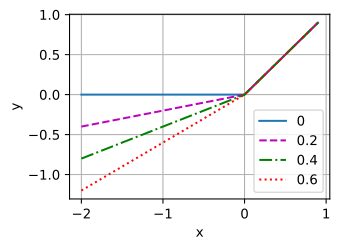
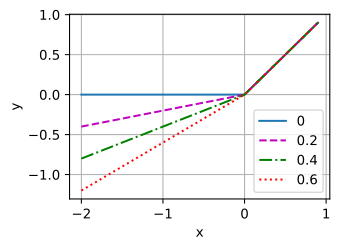
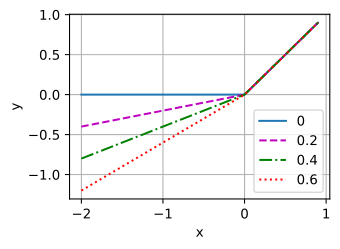
識別器は通常の畳み込みネットワークであるが、活性化関数として leaky ReLU を用いる点が異なる。\(\alpha \in[0, 1]\) に対して、その定義は次のとおりである。
見てのとおり、\(\alpha=0\) なら通常の ReLU、\(\alpha=1\) なら恒等関数である。\(\alpha \in (0, 1)\) では、leaky ReLU は負の入力に対しても 0 でない出力を返す非線形関数である。、ニューロンが常に負の値を出力してしまい、ReLU の勾配が 0 であるために学習が進まなくなる「dying ReLU」問題を解決することを目的としている。
alphas = [0, .2, .4, .6, .8, 1]
x = d2l.arange(-2, 1, 0.1)
Y = [d2l.numpy(nn.LeakyReLU(alpha)(x)) for alpha in alphas]
d2l.plot(d2l.numpy(x), Y, 'x', 'y', alphas)
alphas = [0, .2, .4, .6, .8, 1]
x = d2l.arange(-2, 1, 0.1)
Y = [d2l.numpy(nn.LeakyReLU(alpha)(x)) for alpha in alphas]
d2l.plot(d2l.numpy(x), Y, 'x', 'y', alphas)
alphas = [0, .2, .4, .6, .8, 1]
x = tf.range(-2, 1, 0.1)
Y = [tf.keras.layers.LeakyReLU(alpha)(x).numpy() for alpha in alphas]
d2l.plot(x.numpy(), Y, 'x', 'y', alphas)
識別器の基本ブロックは、畳み込み層の後にバッチ正規化層と leaky ReLU 活性化を続けたものである。畳み込み層のハイパーパラメータは、生成器ブロックの転置畳み込み層と似ている。
class D_block(nn.Module):
    def __init__(self, out_channels, in_channels=3, kernel_size=4, strides=2,
                padding=1, alpha=0.2, **kwargs):
        super(D_block, self).__init__(**kwargs)
        self.conv2d = nn.Conv2d(in_channels, out_channels, kernel_size,
                                strides, padding, bias=False)
        self.batch_norm = nn.BatchNorm2d(out_channels)
        self.activation = nn.LeakyReLU(alpha, inplace=True)

    def forward(self, X):
        return self.activation(self.batch_norm(self.conv2d(X)))
class D_block(nn.Block):
    def __init__(self, channels, kernel_size=4, strides=2,
                 padding=1, alpha=0.2, **kwargs):
        super(D_block, self).__init__(**kwargs)
        self.conv2d = nn.Conv2D(
            channels, kernel_size, strides, padding, use_bias=False)
        self.batch_norm = nn.BatchNorm()
        self.activation = nn.LeakyReLU(alpha)

    def forward(self, X):
        return self.activation(self.batch_norm(self.conv2d(X)))
class D_block(tf.keras.layers.Layer):
    def __init__(self, out_channels, kernel_size=4, strides=2, padding="same",
                 alpha=0.2, **kwargs):
        super().__init__(**kwargs)
        self.conv2d = tf.keras.layers.Conv2D(out_channels, kernel_size,
                                             strides, padding, use_bias=False)
        self.batch_norm = tf.keras.layers.BatchNormalization()
        self.activation = tf.keras.layers.LeakyReLU(alpha)

    def call(self, X):
        return self.activation(self.batch_norm(self.conv2d(X)))
デフォルト設定の基本ブロックは、 7.3 章 で示したように、入力の幅と高さを半分にする。たとえば、入力形状が \(n_h = n_w = 16\)、カーネル形状が \(k_h = k_w = 4\)、ストライド形状が \(s_h = s_w = 2\)、パディング形状が \(p_h = p_w = 1\) のとき、出力形状は次のようになる。
x = torch.zeros((2, 3, 16, 16))
d_blk = D_block(20)
d_blk(x).shape
torch.Size([2, 20, 8, 8])
x = np.zeros((2, 3, 16, 16))
d_blk = D_block(20)
d_blk.initialize()
d_blk(x).shape
(2, 20, 8, 8)
x = tf.zeros((2, 16, 16, 3))
d_blk = D_block(20)
d_blk(x).shape
TensorShape([2, 8, 8, 20])
識別器は生成器の鏡像である。
n_D = 64
net_D = nn.Sequential(
    D_block(n_D),  # 出力: (64, 32, 32)
    D_block(in_channels=n_D, out_channels=n_D*2),  # 出力: (64 * 2, 16, 16)
    D_block(in_channels=n_D*2, out_channels=n_D*4),  # 出力: (64 * 4, 8, 8)
    D_block(in_channels=n_D*4, out_channels=n_D*8),  # 出力: (64 * 8, 4, 4)
    nn.Conv2d(in_channels=n_D*8, out_channels=1,
              kernel_size=4, bias=False))  # 出力: (1, 1, 1)
n_D = 64
net_D = nn.Sequential()
net_D.add(D_block(n_D),   # 出力: (64, 32, 32)
          D_block(n_D*2),  # 出力: (64 * 2, 16, 16)
          D_block(n_D*4),  # 出力: (64 * 4, 8, 8)
          D_block(n_D*8),  # 出力: (64 * 8, 4, 4)
          nn.Conv2D(1, kernel_size=4, use_bias=False))  # 出力: (1, 1, 1)
n_D = 64
net_D = tf.keras.Sequential([
    D_block(n_D), # 出力: (32, 32, 64)
    D_block(out_channels=n_D*2), # 出力: (16, 16, 64 * 2)
    D_block(out_channels=n_D*4), # 出力: (8, 8, 64 * 4)
    D_block(out_channels=n_D*8), # 出力: (4, 4, 64 * 64)
    # 出力: (1, 1, 1)
    tf.keras.layers.Conv2D(1, kernel_size=4, use_bias=False)
])
最終層には出力チャネル数 \(1\) の畳み込み層を用いて、単一の予測値を得る。
x = torch.zeros((1, 3, 64, 64))
net_D(x).shape
torch.Size([1, 1, 1, 1])
x = np.zeros((1, 3, 64, 64))
net_D.initialize()
net_D(x).shape
(1, 1, 1, 1)
x = tf.zeros((1, 64, 64, 3))
net_D(x).shape
TensorShape([1, 1, 1, 1])
20.2.4. 学習
20.1 章 の基本的な GAN
と比べると、生成器と識別器は互いに似ているため、両者に同じ学習率を用いる。さらに、Adam(12.10 章)の
\(\beta_1\) を \(0.9\) から \(0.5\)
に変更する。生成器と識別器が互いに競い合うことで勾配が急速に変化するため、過去の勾配の指数移動平均であるモーメンタムの滑らかさを下げるものである。加えて、ランダムに生成されるノイズ
Z は 4 次元テンソルであり、計算の高速化のために GPU を使用する。
def train(net_D, net_G, data_iter, num_epochs, lr, latent_dim,
          device=d2l.try_gpu()):
    loss = nn.BCEWithLogitsLoss(reduction='sum')
    for w in net_D.parameters():
        nn.init.normal_(w, 0, 0.02)
    for w in net_G.parameters():
        nn.init.normal_(w, 0, 0.02)
    net_D, net_G = net_D.to(device), net_G.to(device)
    trainer_hp = {'lr': lr, 'betas': [0.5,0.999]}
    trainer_D = torch.optim.Adam(net_D.parameters(), **trainer_hp)
    trainer_G = torch.optim.Adam(net_G.parameters(), **trainer_hp)
    animator = d2l.Animator(xlabel='epoch', ylabel='loss',
                            xlim=[1, num_epochs], nrows=2, figsize=(5, 5),
                            legend=['discriminator', 'generator'])
    animator.fig.subplots_adjust(hspace=0.3)
    for epoch in range(1, num_epochs + 1):
        # 1エポック分学習する
        timer = d2l.Timer()
        metric = d2l.Accumulator(3)  # 損失D、損失G、サンプル数
        for X, _ in data_iter:
            batch_size = X.shape[0]
            Z = torch.normal(0, 1, size=(batch_size, latent_dim, 1, 1))
            X, Z = X.to(device), Z.to(device)
            metric.add(d2l.update_D(X, Z, net_D, net_G, loss, trainer_D),
                       d2l.update_G(Z, net_D, net_G, loss, trainer_G),
                       batch_size)
        # 生成された例を表示する
        Z = torch.normal(0, 1, size=(21, latent_dim, 1, 1), device=device)
        # 合成データを N(0, 1) に正規化する
        fake_x = net_G(Z).permute(0, 2, 3, 1) / 2 + 0.5
        imgs = torch.cat(
            [torch.cat([
                fake_x[i * 7 + j].cpu().detach() for j in range(7)], dim=1)
             for i in range(len(fake_x)//7)], dim=0)
        animator.axes[1].cla()
        animator.axes[1].imshow(imgs)
        # 損失を表示する
        loss_D, loss_G = metric[0] / metric[2], metric[1] / metric[2]
        animator.add(epoch, (loss_D, loss_G))
    print(f'loss_D {loss_D:.3f}, loss_G {loss_G:.3f}, '
          f'{metric[2] / timer.stop():.1f} examples/sec on {str(device)}')
def train(net_D, net_G, data_iter, num_epochs, lr, latent_dim,
          device=d2l.try_gpu()):
    loss = gluon.loss.SigmoidBCELoss()
    net_D.initialize(init=init.Normal(0.02), force_reinit=True, ctx=device)
    net_G.initialize(init=init.Normal(0.02), force_reinit=True, ctx=device)
    trainer_hp = {'learning_rate': lr, 'beta1': 0.5}
    trainer_D = gluon.Trainer(net_D.collect_params(), 'adam', trainer_hp)
    trainer_G = gluon.Trainer(net_G.collect_params(), 'adam', trainer_hp)
    animator = d2l.Animator(xlabel='epoch', ylabel='loss',
                            xlim=[1, num_epochs], nrows=2, figsize=(5, 5),
                            legend=['discriminator', 'generator'])
    animator.fig.subplots_adjust(hspace=0.3)
    for epoch in range(1, num_epochs + 1):
        # 1エポック分学習する
        timer = d2l.Timer()
        metric = d2l.Accumulator(3)  # 損失D、損失G、サンプル数
        for X, _ in data_iter:
            batch_size = X.shape[0]
            Z = np.random.normal(0, 1, size=(batch_size, latent_dim, 1, 1))
            X, Z = X.as_in_ctx(device), Z.as_in_ctx(device),
            metric.add(d2l.update_D(X, Z, net_D, net_G, loss, trainer_D),
                       d2l.update_G(Z, net_D, net_G, loss, trainer_G),
                       batch_size)
        # 生成された例を表示する
        Z = np.random.normal(0, 1, size=(21, latent_dim, 1, 1), ctx=device)
        # 合成データを N(0, 1) に正規化する
        fake_x = net_G(Z).transpose(0, 2, 3, 1) / 2 + 0.5
        imgs = np.concatenate(
            [np.concatenate([fake_x[i * 7 + j] for j in range(7)], axis=1)
             for i in range(len(fake_x)//7)], axis=0)
        animator.axes[1].cla()
        animator.axes[1].imshow(imgs.asnumpy())
        # 損失を表示する
        loss_D, loss_G = metric[0] / metric[2], metric[1] / metric[2]
        animator.add(epoch, (loss_D, loss_G))
    print(f'loss_D {loss_D:.3f}, loss_G {loss_G:.3f}, '
          f'{metric[2] / timer.stop():.1f} examples/sec on {str(device)}')
def train(net_D, net_G, data_iter, num_epochs, lr, latent_dim,
          device=d2l.try_gpu()):
    loss = tf.keras.losses.BinaryCrossentropy(
        from_logits=True, reduction=tf.keras.losses.Reduction.SUM)

    for w in net_D.trainable_variables:
        w.assign(tf.random.normal(mean=0, stddev=0.02, shape=w.shape))
    for w in net_G.trainable_variables:
        w.assign(tf.random.normal(mean=0, stddev=0.02, shape=w.shape))

    optimizer_hp = {"lr": lr, "beta_1": 0.5, "beta_2": 0.999}
    optimizer_D = tf.keras.optimizers.Adam(**optimizer_hp)
    optimizer_G = tf.keras.optimizers.Adam(**optimizer_hp)

    animator = d2l.Animator(xlabel='epoch', ylabel='loss',
                            xlim=[1, num_epochs], nrows=2, figsize=(5, 5),
                            legend=['discriminator', 'generator'])
    animator.fig.subplots_adjust(hspace=0.3)

    for epoch in range(1, num_epochs + 1):
        # 1エポック分学習する
        timer = d2l.Timer()
        metric = d2l.Accumulator(3) # 損失D、損失G、サンプル数
        for X, _ in data_iter:
            batch_size = X.shape[0]
            Z = tf.random.normal(mean=0, stddev=1,
                                 shape=(batch_size, 1, 1, latent_dim))
            metric.add(d2l.update_D(X, Z, net_D, net_G, loss, optimizer_D),
                       d2l.update_G(Z, net_D, net_G, loss, optimizer_G),
                       batch_size)

        # 生成された例を表示する
        Z = tf.random.normal(mean=0, stddev=1, shape=(21, 1, 1, latent_dim))
        # 合成データを N(0, 1) に正規化する
        fake_x = net_G(Z) / 2 + 0.5
        imgs = tf.concat([tf.concat([fake_x[i * 7 + j] for j in range(7)],
                                    axis=1)
                          for i in range(len(fake_x) // 7)], axis=0)
        animator.axes[1].cla()
        animator.axes[1].imshow(imgs)
        # 損失を表示する
        loss_D, loss_G = metric[0] / metric[2], metric[1] / metric[2]
        animator.add(epoch, (loss_D, loss_G))
    print(f'loss_D {loss_D:.3f}, loss_G {loss_G:.3f}, '
          f'{metric[2] / timer.stop():.1f} examples/sec on {str(device._device_name)}')
ここでは、デモのために少ないエポック数でモデルを学習する。より良い性能を得るには、変数
num_epochs をより大きな値に設定できる。
latent_dim, lr, num_epochs = 100, 0.005, 20
train(net_D, net_G, data_iter, num_epochs, lr, latent_dim)
loss_D 0.296, loss_G 6.400, 2411.4 examples/sec on cuda:0

latent_dim, lr, num_epochs = 100, 0.005, 20
train(net_D, net_G, data_iter, num_epochs, lr, latent_dim)
loss_D 0.098, loss_G 5.782, 2591.0 examples/sec on gpu(0)

latent_dim, lr, num_epochs = 100, 0.0005, 40
train(net_D, net_G, data_iter, num_epochs, lr, latent_dim)
loss_D 0.116, loss_G 6.713, 2115.0 examples/sec on /GPU:0

20.2.5. まとめ
DCGAN アーキテクチャは、識別器に 4 層の畳み込み層、生成器に 4 層の「fractionally-strided」畳み込み層を持つ。
識別器は、バッチ正規化(入力層を除く)と leaky ReLU 活性化を備えた 4 層のストライド付き畳み込みからなる。
Leaky ReLU は、負の入力に対して 0 でない出力を返す非線形関数である。「dying ReLU」問題を解決し、アーキテクチャ全体で勾配が流れやすくなるのを助ける。
20.2.6. 演習
leaky ReLU の代わりに標準的な ReLU 活性化を使うとどうなるか?
DCGAN を Fashion-MNIST に適用し、どのカテゴリがうまくいき、どのカテゴリがうまくいかないかを調べなさい。